Minecraft Sign Generator
Craft your custom wooden sign — choose wood type, dye color, and text size. Perfect for server rules or base labels.
📝 Sign Text
🪵 Wood Type
🎨 Color & Size
Minecraft Sign Generator
Create a Minecraft-style sign preview directly in your browser. Enter your own text, choose a wood style, select a text color, adjust the text size, and download the finished sign as a PNG.
The tool is designed for quick sign planning and gaming graphics. You can use it to preview labels, shop signs, server messages, build names, and other short pieces of Minecraft-inspired text before using them in your project.
Minecraft Sign Generator
Use the generator above to create your sign:
- Enter up to 4 lines of text
- Choose from 8 available wood styles
- Select from 16 available text colors
- Adjust text size from 50% to 150%
- Show or hide the wooden post
- Preview changes instantly
- Download the result as a PNG
The tool runs in your browser and does not require Minecraft to be installed.
How to Use the Minecraft Sign Generator
1. Enter Your Text
Type your message into the text box. The generator supports up to four lines, so you can create short labels, directions, names, signs, or announcements.
For a cleaner result, keep each line reasonably short.
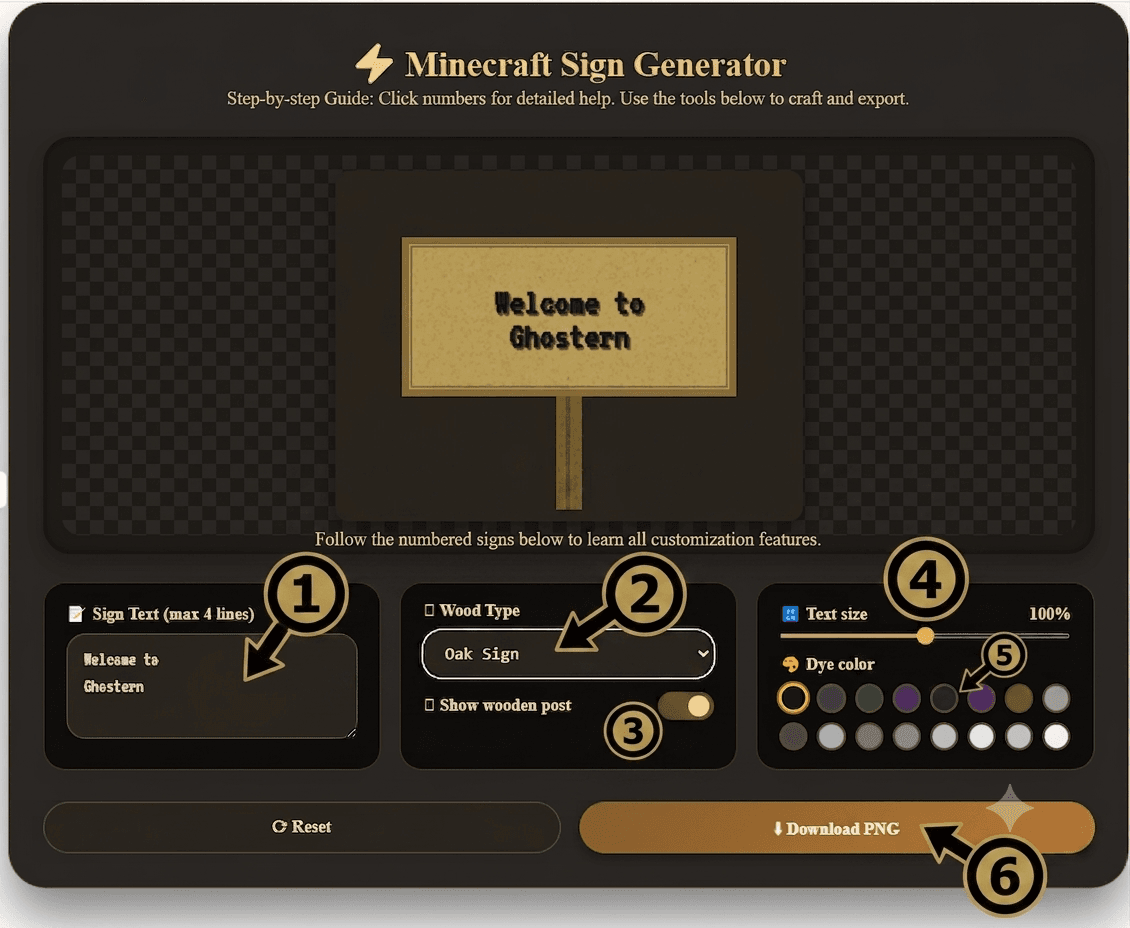
2. Choose a Wood Style
Select the sign style you want from the available options:
- Oak
- Spruce
- Birch
- Jungle
- Acacia
- Dark Oak
- Crimson
- Warped
Each option changes the colors used for the sign board, border, and wooden post.
3. Show or Hide the Wooden Post
Use the Show wooden post toggle to control whether the vertical post appears below the sign.
Keep it enabled for a complete signpost preview. Turn it off when you only need the sign board for another graphic.
4. Adjust Text Size
Use the text-size slider to scale the lettering between 50% and 150%.
Smaller settings can help when your message contains more text, while larger settings work well for short headings.
5. Choose a Text Color
The color palette provides 16 selectable colors for the sign text.
Try different combinations with the available wood styles to find a result that is easy to read.
6. Preview the Sign
The canvas updates automatically as you change the text, wood style, post setting, text size, or color.
7. Download Your PNG
When you’re happy with the result, select Download PNG.
The current tool exports the browser canvas as a PNG file named:
minecraft_sign.png
Available Wood Styles
The current version of the tool includes eight sign styles.
Oak
A light brown style suitable for general-purpose signs, labels, and build names.
Spruce
A darker brown style that can work well for cabins, forests, mountain builds, and rustic designs.
Birch
A lighter sign style that creates more contrast with dark text.
Jungle
A warmer brown style suited to jungle-themed or adventure builds.
Acacia
A warmer orange-brown appearance for signs that need more visual contrast.
Dark Oak
A dark brown style that works well for interiors, darker builds, and strong text contrast.
Crimson
A dark red Nether-inspired style.
Warped
A green-blue style inspired by the Nether’s warped wood palette.
Text and Color Controls
The generator gives you control over the main visual elements of the sign without requiring an external editor.
You can change:
- Sign text
- Text size
- Text color
- Wood style
- Wooden post visibility
The preview is generated on a 400 × 300 pixel canvas.
What Can You Use the Generated Sign For?
The PNG output can be useful for:
- Minecraft build planning
- Server sign concepts
- Shop and market labels
- Base names and location markers
- YouTube thumbnails
- Discord graphics
- Gaming posts and banners
- Build documentation
- Reference images
The tool creates an image preview. It does not place the sign directly inside a Minecraft world.
Is This an Exact Minecraft Renderer?
No.
The generator creates a Minecraft-style sign preview in the browser. It uses its own canvas rendering, colors, procedural grain effect, border, and web font rather than loading the official Minecraft game renderer or official game texture files.
That means the result should be treated as a visual design and planning tool rather than an exact reproduction of every current Minecraft rendering detail.
Minecraft itself can have version- and edition-specific differences, so the generated image should not be used as a guarantee of how the sign will look in every Minecraft version.
Current Tool Limitations
The current version has a deliberately simple feature set:
- 8 wood styles
- Up to 4 lines of text
- 16 color choices
- 50%–150% text scaling
- Optional wooden post
- 400 × 300 pixel canvas
- PNG export
- Browser-based preview
It does not currently provide:
- Direct Minecraft world import
- Direct sign placement in Minecraft
- Exact Java Edition rendering
- Exact Bedrock Edition rendering
- Front-and-back sign editing
- Glow Ink Sac effects
- Custom font uploads
- In-game command generation
Tips for Better Sign Designs
Keep Text Short
Short messages are generally easier to read. Try simple labels such as:
SHOP
WELCOME
RULES
BASE
EXIT
Use Multiple Lines Carefully
Four lines are supported, but long messages can make the sign difficult to read. Break longer information into short sections.
Test Different Wood Styles
The same text can look very different depending on the selected wood style. Try several options before downloading the final version.
Adjust the Text Size
Start around 100% and reduce the size when you need more room. Increase it for short titles and prominent labels.
Hide the Post for Composite Graphics
When you’re placing the sign into a thumbnail, banner, or other image, disabling the post can give you a cleaner board-only result.
Frequently Asked Questions
What does the Minecraft Sign Generator create?
It creates a Minecraft-style wooden sign preview with custom text, selectable wood styles, text colors, adjustable text size, and an optional wooden post.
Can I download a transparent PNG?
Yes. The canvas is cleared before the sign is drawn, so areas outside the sign remain transparent in the PNG export.
How many text lines are supported?
The current tool supports up to four lines of text.
Which wood styles are available?
The generator currently includes Oak, Spruce, Birch, Jungle, Acacia, Dark Oak, Crimson, and Warped.
Does the generator work on mobile?
Yes. It runs in a web browser, so it can be used on supported mobile and desktop browsers with JavaScript enabled.
Does the tool place signs directly inside Minecraft?
No. It creates a visual PNG preview. It does not connect to a Minecraft world or place blocks in-game.
Does it support Java and Bedrock rendering?
No. The generator creates a Minecraft-style browser preview and does not attempt to reproduce every Java Edition or Bedrock Edition rendering detail.
More Minecraft Tools from Ghostern
Explore other Minecraft utilities available on Ghostern:
You can also browse the full Minecraft Tools section.
About the Creator
Sharjeel is the developer behind Ghostern’s browser-based gaming tools.
The tools are built to make common gaming-related tasks easier to preview, plan, and create directly in a web browser.
About Ghostern
Ghostern creates browser-based tools for gamers, builders, and content creators.
This Minecraft Sign Generator is an independent fan-made utility and is not affiliated with or endorsed by Mojang Studios or Microsoft.
Last updated: August 23, 2026