
Elden Ring Text Generator
Create epic golden text in the style of the Lands Between -- perfect for YouTube thumbnails, Discord profiles, and fan art.
Text Content
Font & Color
Background & Effects
Export Size & Format
Craft gilded typography worthy of the Erdtree. The Elden Ring Font Generator brings the iconic, medieval aesthetic of FromSoftware’s masterpiece straight to your fingertips. Whether you are designing a boss meme, a YouTube thumbnail, a Twitch overlay, or a custom phone wallpaper, this tool delivers authentic, high‑quality text with zero design experience required. Type, tweak, and download – all in seconds.
Elden Ring’s typography is instantly recognisable – bold, serif‑heavy, and drenched in gold. It evokes the grandeur of the Lands Between, the weight of the Elden Ring itself, and the grim determination of the Tarnished. This generator gives you four font styles and seven lore-themed color effects — from classic gilded gold to Scarlet Rot, Frostbite, and Moonveil — with live previews and multiple export sizes for thumbnails, profile pictures, and mobile wallpapers.
What Font Does Elden Ring Actually Use?
The Elden Ring wordmark is built on Mantinia, a serif typeface designed by Matthew Carter in 1993 for Carter & Cone Type, drawing on Renaissance-era Roman inscriptional lettering. It’s a commercial font, not freely licensed — which is why this generator, like most free Elden Ring text tools, uses Cinzel instead: an open-license serif inspired by the same first-century Roman inscriptions, with a similar high-contrast, monumental feel. It won’t match Mantinia letterform-for-letterform, but styled with the gold gradient and drop shadow below, it captures the same “carved into a monument” quality the game’s branding goes for.
How to Use the Elden Ring Font Generator
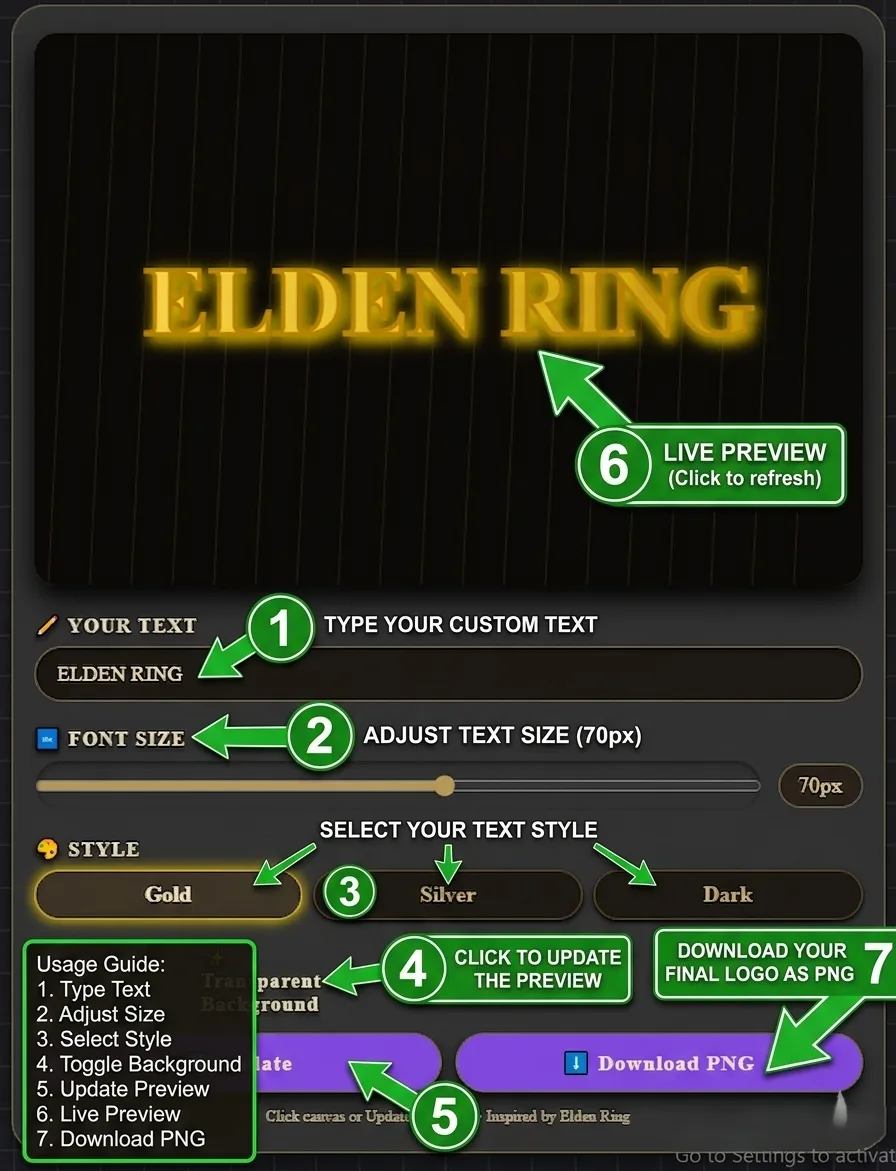
Using the generator is intuitive. Here is the complete workflow:
- Start from a preset or type your own. Click a quick preset — GREAT ENEMY FELLED, GOD SLAIN, RUNE ARCANE, GRACE RESTORED, YOU DIED, or SITE OF GRACE — or type your own main text and subtitle directly.
- Choose a font style. Pick from four typefaces: Golden (Cinzel), Divine (Uncial), Crimson (MedievalSharp), or Abyssal (Gothic/Pirata One).
- Pick a color. Choose one of seven lore-themed effects — Elden Gold, Erdtree Gold, Scarlet Rot, Frostbite, Moonveil, Blood Red, Pure White — or set a fully custom color with the color picker. The two-tone themes (Scarlet Rot, Frostbite, Moonveil, Erdtree Gold) render as a real gradient across your text, not a flat fill.
- Set a background. Choose from the built-in gallery (Solid Black, Erdtree, Limgrave, Mountaintops, Roundtable Hold, Golden Gradient) or upload your own image, then adjust the opacity slider to control how much it shows through behind your text.
- Toggle extras. Turn on the Rune Counter for a decorative “Runes: 24,678” readout, or toggle the Golden Glow effect on or off.
- Pick your export size and format. Choose Standard (600×300), YouTube Thumbnail (1280×720), Square/PFP (1080×1080), or Story/Mobile Wallpaper (1080×1920), and export as PNG (best quality) or JPG (smaller file).
- Download. Click Download to save your image at the size and format you chose.
Features of the Elden Ring Font Generator
Live Preview
See your text transform instantly as you type, change fonts, or switch themes.
Seven Lore Themes
Elden Gold, Erdtree Gold, Scarlet Rot, Frostbite, Moonveil, Blood Red, and Pure White, plus a full custom color picker.
Four Font Styles
Cinzel, Uncial Antiqua, MedievalSharp, and Pirata One, covering golden, divine, crimson, and abyssal-gothic looks.
Background Gallery + Custom Upload
Six built-in Elden Ring-inspired backgrounds, or upload your own image, with an opacity slider to blend it with your text.
Multiple Export Sizes
Standard, YouTube Thumbnail, Square/PFP, and Story/Mobile Wallpaper presets, exported as PNG or JPG.
Client‑Side Only
Everything runs in your browser. No data is sent to any server – your text stays private.
Understanding Elden Ring’s Typography Style
Elden Ring’s visual identity is built on a foundation of medieval grandeur, gothic austerity, and FromSoftware’s signature attention to detail. The typography is no exception.
Visual Characteristics
- Serif‑heavy letterforms. Mantinia’s Roman-inscription roots carry through into Elden Ring’s UI and title cards. Cinzel, used here, is drawn from the same tradition of first-century Roman capitals.
- Gold and metallic gradients. The signature Elden Ring look uses warm gold gradients from bright yellow to deep amber, with a subtle drop shadow that gives the text a “raised” or “engraved” appearance.
- Bold, uppercase emphasis. Boss names, titles, and key UI elements are almost always rendered in uppercase. This conveys authority, weight, and the epic scale of the Lands Between.
- Dark backgrounds. Elden Ring’s text almost always appears against dark, moody backgrounds – black, deep grey, or shadowy landscapes. This creates maximum contrast and makes the gold text pop.
How Elden Ring Differs from Dark Souls Typography
| Aspect | Elden Ring | Dark Souls |
|---|---|---|
| Primary Colour | Gold / Amber | White / Grey |
| Reference Font | Mantinia (commercial) / Cinzel (free alt.) | Lower‑contrast serif |
| Drop Shadow | Strong, dark shadow | Subtle or none |
| Uppercase | Always for titles and bosses | Mixed case |
| Overall Vibe | Regal, epic, luminous | Grim, sombre, faded |
Best Use Cases for Elden Ring‑Style Text
Design Tips from Experienced Creators
- Use uppercase for maximum impact. Elden Ring titles and boss names are almost always uppercase.
- Keep it short (1–3 words). The generator works best with short, punchy phrases like “MALENIA” or “YOU DIED”.
- Pair with a dark background. The gold-toned themes pop best against dark, moody backgrounds — try Solid Black or the Golden Gradient option.
- Match your export size to where you’re posting. YouTube Thumbnail for videos, Square/PFP for profile pictures and Discord, Story/Mobile Wallpaper for phone backgrounds.
- Match the theme to the mood. Elden Gold or Erdtree Gold for heroic, triumphant messages. Frostbite for cold, ethereal themes (Ranni’s questline). Scarlet Rot or Blood Red for corrupted or villainous content (Mohg, the Frenzied Flame).
Frequently Asked Questions
❓ What font does Elden Ring actually use for its logo?
The logo is built on Mantinia, a serif typeface designed by Matthew Carter in 1993. It’s a commercial font, so this generator uses Cinzel — a free, open-license serif from the same Roman-inscription tradition — as the closest practical alternative.
❓ Is this Elden Ring font generator free?
Yes, completely free. No signup, no watermarks, no hidden fees. Generate as many images as you want for personal or commercial projects.
❓ Can I use the generated PNGs in my YouTube videos or Twitch streams?
Absolutely. The tool is free for both personal and commercial use. You can use the outputs in videos, streams, merchandise, and any other project without attribution (though a shoutout to Ghostern is appreciated).
❓ Why does my text look different from the game’s actual logo?
The game’s logo uses Mantinia, a commercial font not available for free tools to license. Cinzel gives you the closest open-license approximation — the gradients and shadows here are designed to mimic the overall look, not reproduce the exact letterforms.
❓ Does the tool work on mobile?
Yes, the interface is fully responsive. All sliders, buttons, and input fields work on iOS and Android. The canvas adapts to smaller screens.
❓ What themes are available?
Seven lore-themed color effects: Elden Gold, Erdtree Gold, Scarlet Rot, Frostbite, Moonveil, Blood Red, and Pure White — plus a custom color picker if you want something entirely your own. Four two-tone themes (Scarlet Rot, Frostbite, Moonveil, Erdtree Gold) render as a real gradient rather than a flat color.
❓ Can I use my own background image?
Yes — upload any image and adjust the opacity slider to control how strongly it shows through behind your text, or choose one of the six built-in Elden Ring-inspired backgrounds instead.
❓ What resolution can I export at?
Four sizes: Standard (600×300) for general use, YouTube Thumbnail (1280×720), Square/PFP (1080×1080), and Story/Mobile Wallpaper (1080×1920) — plus a choice of PNG (best quality) or JPG (smaller file) for each.
❓ Is this tool affiliated with FromSoftware or Bandai Namco?
No, this is an independent fan tool. FromSoftware and Bandai Namco do not endorse or sponsor this generator. All game names and trademarks are property of their respective owners.
❓ Can I use this for other FromSoftware games (Dark Souls, Bloodborne, Sekiro)?
The gold and darker themes work well for Dark Souls, Bloodborne, and Sekiro content too — for a purpose-built option, try the Dark Souls Font Generator instead.
Related Elden Ring Design Resources
⚔️ Forge Your Elden Ring Text Now
Type your message, choose your font, theme, and background, then export at the size you need. No signup, no watermarks, no limits.
📅 Last updated: September 2026 | Tool by Ghostern – independent creator, not affiliated with FromSoftware or Bandai Namco.
📚 Cinzel, Uncial Antiqua, MedievalSharp, and Pirata One fonts licensed under the Open Font License. All generated content is your own.