Elden Ring Text Generator
Create epic golden text in the style of the Lands Between -- perfect for YouTube thumbnails, Discord profiles, and fan art.
Text Content
Font & Color
Background & Effects
Export Size & Format
Craft gilded typography worthy of the Erdtree. The Elden Ring Font Generator brings the iconic, medieval aesthetic of FromSoftware’s masterpiece straight to your fingertips. Whether you are designing a boss meme, a YouTube thumbnail, a Twitch overlay, or a custom phone wallpaper, this tool delivers authentic, high‑quality text with zero design experience required. Type, tweak, and download – all in seconds.
What Font Does Elden Ring Actually Use?
The Elden Ring wordmark is built on Mantinia, a serif typeface designed by Matthew Carter in 1993 for Carter & Cone Type, drawing on Renaissance-era Roman inscriptional lettering. It’s a commercial font, not freely licensed — which is why this generator, like most free Elden Ring text tools, uses Cinzel instead: an open-license serif inspired by the same first-century Roman inscriptions, with a similar high-contrast, monumental feel. It won’t match Mantinia letterform-for-letterform, but styled with the gold gradient and drop shadow below, it captures the same “carved into a monument” quality the game’s branding goes for.
Elden Ring’s typography is instantly recognisable – bold, serif‑heavy, and drenched in gold. It evokes the grandeur of the Lands Between, the weight of the Elden Ring itself, and the grim determination of the Tarnished. This generator gives you Cinzel with customisable gold, silver, and dark themes, live previews, and transparent PNG exports.
How to Use the Elden Ring Font Generator
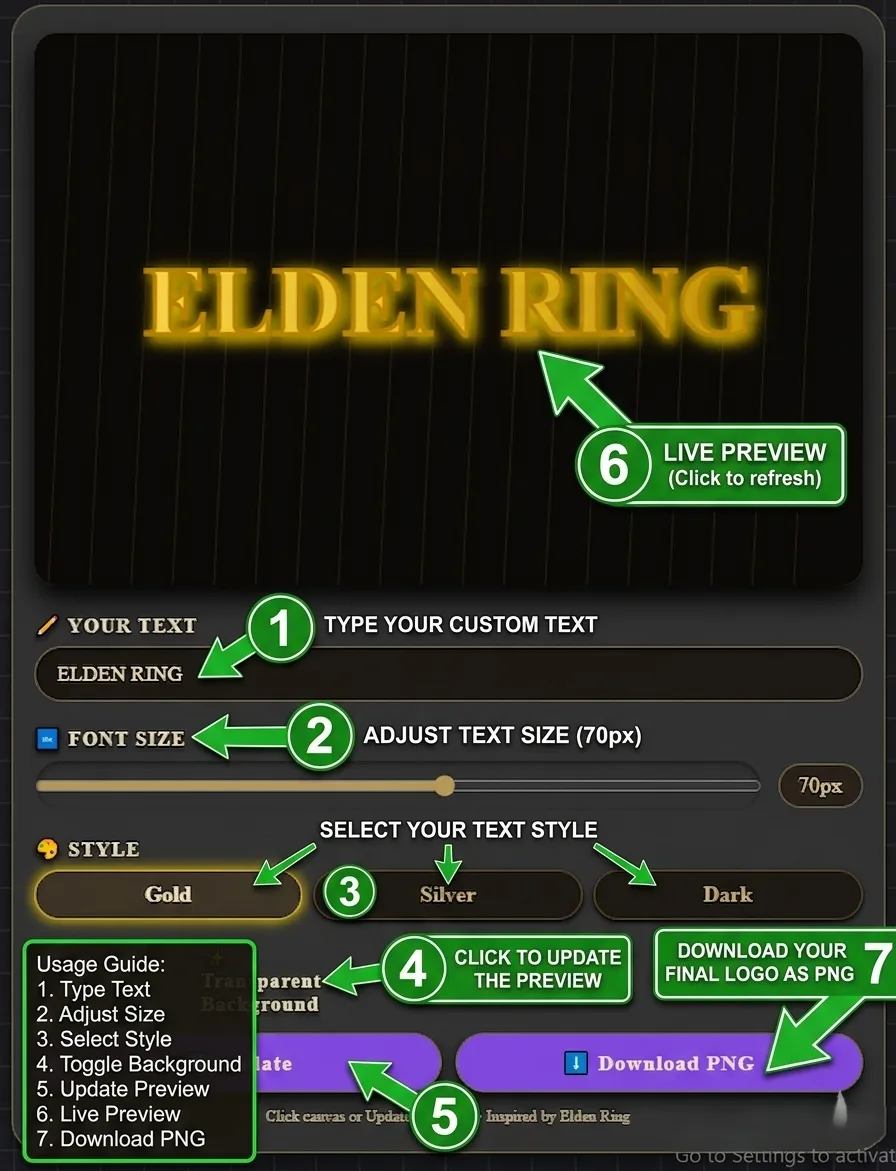
Using the generator is intuitive. Here is the complete workflow:
- Enter your text. Type any word, phrase, or boss name (up to 25 characters). The live canvas updates in real time. Try “MALENIA”, “ELDEN RING”, or “YOU DIED” for instant impact.
- Adjust font size. Use the slider to scale from 30px to 100px. Larger sizes (80–100px) create dramatic titles; smaller sizes (40–60px) work for subtitles or details.
- Choose a style theme. Select Gold (classic gilded Elden Ring look), Silver (frosty, cold aesthetic), or Dark (shadow‑touched, edgy vibe). Each theme applies a unique gradient, glow, and shadow combination.
- Toggle transparent background. Enable this for a clean, overlay‑ready PNG. Perfect for layering over screenshots, wallpapers, or video footage.
- Preview your creation. The canvas shows a live preview with a subtle dark background and decorative grid lines when transparency is off.
- Download your PNG. Click the “Download PNG” button to save your Elden Ring‑style text as a high‑resolution, lossless image file.
Features of the Elden Ring Font Generator
Live Preview
See your text transform instantly as you type, resize, or change styles. No waiting, no refreshing.
PNG Download
Export high‑resolution PNG images with a single click. Perfect for thumbnails, overlays, and social media.
Transparent Background
Toggle transparency for a clean overlay that layers perfectly over any image or video.
Three Themes
Choose from Gold (classic), Silver (frosty), or Dark (shadow) – each with unique gradients and glows.
Mobile Compatible
Fully responsive design works on phones and tablets. All controls are touch‑friendly.
Client‑Side Only
Everything runs in your browser. No data is sent to any server – your text stays private.
Understanding Elden Ring’s Typography Style
Elden Ring’s visual identity is built on a foundation of medieval grandeur, gothic austerity, and FromSoftware’s signature attention to detail. The typography is no exception.
Visual Characteristics
- Serif‑heavy letterforms. Mantinia’s Roman-inscription roots carry through into Elden Ring’s UI and title cards. Cinzel, used here, is drawn from the same tradition of first-century Roman capitals.
- Gold and metallic gradients. The signature Elden Ring look uses warm gold gradients from bright yellow to deep amber, with a subtle drop shadow that gives the text a “raised” or “engraved” appearance.
- Bold, uppercase emphasis. Boss names, titles, and key UI elements are almost always rendered in uppercase. This conveys authority, weight, and the epic scale of the Lands Between.
- Dark backgrounds. Elden Ring’s text almost always appears against dark, moody backgrounds – black, deep grey, or shadowy landscapes. This creates maximum contrast and makes the gold text pop.
How Elden Ring Differs from Dark Souls Typography
| Aspect | Elden Ring | Dark Souls |
|---|---|---|
| Primary Colour | Gold / Amber | White / Grey |
| Reference Font | Mantinia (commercial) / Cinzel (free alt.) | Lower‑contrast serif |
| Drop Shadow | Strong, dark shadow | Subtle or none |
| Uppercase | Always for titles and bosses | Mixed case |
| Overall Vibe | Regal, epic, luminous | Grim, sombre, faded |
Best Use Cases for Elden Ring‑Style Text
Design Tips from Experienced Creators
- Use uppercase for maximum impact. Elden Ring titles and boss names are almost always uppercase.
- Keep it short (1–3 words). The generator works best with short, punchy phrases like “MALENIA” or “YOU DIED”.
- Pair with a dark background. The gold and silver themes pop best against dark, moody backgrounds.
- Use transparent mode for overlays. If you’re adding text to a video or image, enable transparent background for a clean composite.
- Match the theme to the mood. Gold for heroic, triumphant messages. Silver for cold, ethereal themes (Ranni’s questline). Dark for corrupted or villainous content (Mohg, the Frenzied Flame).
Frequently Asked Questions
❓ What font does Elden Ring actually use for its logo?
The logo is built on Mantinia, a serif typeface designed by Matthew Carter in 1993. It’s a commercial font, so this generator uses Cinzel — a free, open-license serif from the same Roman-inscription tradition — as the closest practical alternative.
❓ Is this Elden Ring font generator free?
Yes, completely free. No signup, no watermarks, no hidden fees. Generate as many images as you want for personal or commercial projects.
❓ Can I use the generated PNGs in my YouTube videos or Twitch streams?
Absolutely. The tool is free for both personal and commercial use. You can use the outputs in videos, streams, merchandise, and any other project without attribution (though a shoutout to Ghostern is appreciated).
❓ Why does my text look different from the game’s actual logo?
The game’s logo uses Mantinia, a commercial font not available for free tools to license. Cinzel gives you the closest open-license approximation — the gradients and shadows here are designed to mimic the overall look, not reproduce the exact letterforms.
❓ Does the tool work on mobile?
Yes, the interface is fully responsive. All sliders, buttons, and input fields work on iOS and Android. The canvas adapts to smaller screens.
❓ What is the difference between Gold, Silver, and Dark themes?
Gold is the classic Elden Ring look – warm, gilded, and legendary. Silver is cold and frosty, fitting for ice‑themed characters or Ranni’s questline. Dark is edgy and shadowy, with a red glow – suited to corrupted or villainous themes like Mohg or the Frenzied Flame.
❓ What is the maximum resolution of the downloaded PNG?
The canvas exports at 600×400 pixels – good for web use, thumbnails, and social media. For print, upscale the PNG in any image editor; the text renders cleanly at larger sizes.
❓ Is this tool affiliated with FromSoftware or Bandai Namco?
No, this is an independent fan tool. FromSoftware and Bandai Namco do not endorse or sponsor this generator. All game names and trademarks are property of their respective owners.
❓ Can I use this for other FromSoftware games (Dark Souls, Bloodborne, Sekiro)?
The gold and dark themes work well for Dark Souls, Bloodborne, and Sekiro content too — for a purpose-built option, try the Dark Souls Font Generator instead.
Related Elden Ring Design Resources
⚔️ Forge Your Elden Ring Text Now
Type your message, choose your style, and download a PNG that captures the epic spirit of the Lands Between. No signup, no watermarks, no limits.
📅 Last updated: September 2026 | Tool by Ghostern – independent creator, not affiliated with FromSoftware or Bandai Namco.
📚 Cinzel font licensed under the Open Font License. All generated content is your own.