Minecraft Build Generator
Instantly draft fresh Minecraft blueprints, see them in 3D, copy commands, or export your idea.
Top 20 Epic Build Blueprints
🤖 Floating Cyberpunk City
A neon-lit metropolis built on floating glass platforms in the End dimension with active item conduits.
🏠 Deep Ocean Dome
A massive glass dome at the bottom of the deep ocean biome enclosing a premium modern living space.
🏠 Giant Treehouse Kingdom
Multi-level modern living pods suspended on custom built giant jungle trees connected by sleek skywalks.
🗼 Steampunk Airship
A majestic modern air fortress sporting high detail copper sails and fully detailed interior command quarters.
🏰 Medieval Cliffside Castle
A robust keep with a modern rustic split layout nestled into extreme sheer mountain peaks.
🏠 Modern Cliffside Mansion
A breathtaking architectural masterpiece built cleanly with massive glass balconies over deep valley drops.
🏰 Desert Oasis Temple
Intricately detailed sandstone architecture centered on a lush green paradise hidden under desert sands.
🏰 Underground Dwarven City
A titanic hall with massive pillars, a lava powered smelter array, and deepslate decorative columns.
🤖 Orbital Space Station
A futuristic science laboratory high above the cloud layer with airlocks and pressurized glass chambers.
🗼 Japanese Pagoda Complex
A pristine temple of ancient curves combined with modern internal storage frameworks, surrounded by cherry leaves.
🏠 Pirate Cove Retreat
A safe haven hidden within sea caves with wooden docks, standard merchant stalls, and skull statues.
🏠 Abandoned Modern Factory
A derelict concrete assembly plant reclaimed by nature, featuring shattered windows and ivy chains.
🗼 Fairy Mushroom Village
Charming mini-homes built straight into scarlet stems with red glass light arrays guiding the paths.
🏰 Volcanic Evil Lair
An imposing, dark basalt cathedral centered inside a massive volcanic pool of flowing magma.
🏰 Ice Spike Citadel
A grand castle sculpted purely out of blue ice, packed snow, and high glow end rods.
🗼 Sky Island Observatory
A glass stargazing base built atop a levitating dirt structure with a detailed modern brass telescope.
🤖 Post-Apocalyptic City
Crumbling stone towers with modular bridges and fully custom water systems overtaking the floors.
🏠 Giant Aquarium Base
A glass sub-aquatic research facility with interior coral decorations, sea lanterns, and kelp forests.
🗼 Steampunk Clockwork Tower
A massive ticking monolith containing intricate gears made of gold, bronze, and stripped logs.
🏰 Nether Hub Sanctuary
A peaceful modern temple built using nether bricks and crimson wood overlooking a lava ocean.
Whether you are suffering from builder’s block or just want a quick start for your next project, the Minecraft Build Generator is designed to get you building instantly. Instead of staring at an empty plot of land, this tool provides a 3D voxel blueprint, a curated block palette, and starter commands so you can jump straight into the game with a clear vision.
Unlike static image galleries, this generator creates actual structural logic. You can rotate the 3D model, inspect the block choices, and copy a `/give` command to instantly receive your starter materials in both Minecraft Java and Bedrock editions.
How to Use the Minecraft Build Generator
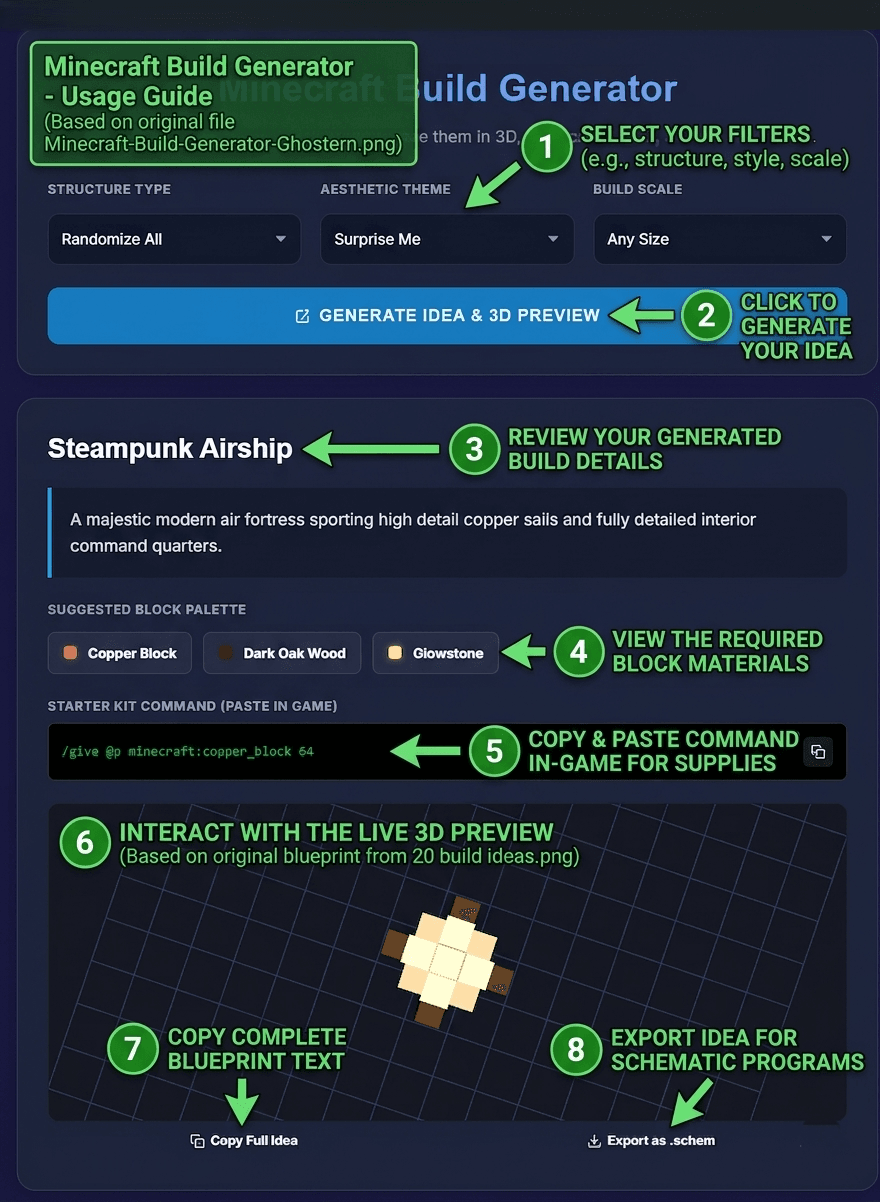
Getting started takes only a few seconds. Here is how to go from an idea to a finished build plan:
- Choose a Structure Type: Select the style you want, such as a Castle, House, Wizard Tower, or Cyberpunk Pod. Each one uses a different mathematical shape and roof logic.
- Set the Dimensions: Adjust the scale to Small, Medium, or Large. The generator keeps the proportions believable as the size changes.
- Pick an Aesthetic Theme: Choose from Medieval, Modern, or High Fantasy. This dictates the block palette—such as oak and cobblestone for medieval, or quartz and glass for modern.
- Preview in 3D: Click “Generate” to see the structure from every angle. Drag to rotate and scroll to zoom in on the details.
- Export Your Build: Use the command output for fast block placement, copy the full idea text, or export the build as a `.schem` file for WorldEdit or Litematica.
Why Use a 3D Build Planner?
Building something great in Minecraft takes more than random block placement. You need shape, balance, proportions, and a layout that feels intentional. This generator handles the structural math for you, which is especially useful for:
- Survival Bases: Plan your house or tower before you gather materials so you know exactly how many blocks you need.
- Server Spawns: Server admins can quickly generate themed structures for hubs and public areas.
- Content Creators: Generate fresh, unique builds for YouTube videos, tutorials, or stream thumbnails without spending hours drafting.
- Learning Builders: By inspecting the 3D model and the Top 20 blueprints below, newer builders can understand how walls, roofs, and supports fit together.
Supported Structure Styles
The generator works best when each structure type follows its own architectural logic. That is what makes the output feel real instead of a random block blob.
🏰 Castles & Fortresses
Robust keeps with corner towers, crenellated walls, and stone block palettes. Perfect for medieval villages or mountain strongholds.
🏠 Houses & Bases
Standard living structures with pitched roofs, windows, and doorways. Adapts well to rustic, modern, or fantasy themes.
🗼 Wizard Towers
Taller, cylindrical shapes with tapering spires. Ideal for fantasy builds, magical hubs, or mage towers in the End dimension.
🤖 Cyberpunk Pods
Futuristic, neon-accented structures using concrete, glass, and sea lanterns. Great for sci-fi cities or modern server hubs.
Frequently Asked Questions
❓ What does the Minecraft Build Generator do?
It procedurally generates 3D Minecraft structure ideas. It provides a live 3D preview, a curated block palette, and starter commands so you can build faster and with more confidence.
❓ Can I use this for survival mode builds?
Yes. It is highly useful for planning houses and towers before you gather materials in survival mode. Use the starter `/give` command in creative mode to preview the blocks, or gather them manually in survival.
❓ Does the tool work on mobile?
Yes. The layout is fully responsive, and the 3D viewport supports touch controls, allowing you to rotate and zoom the build on phones and tablets.
❓ How do I export my build?
You can copy the starter commands to paste directly into Minecraft chat or a command block. You can also export the full build idea as a `.schem` file for use with WorldEdit or Litematica mods.
More Minecraft Tools from Ghostern
📅 Last updated: June 2026 | Tool by Ghostern – independent creator, not affiliated with Mojang or Microsoft.