⚔️ ELDEN RING AR CALCULATOR
By Sharjeel, Lead Developer & Founder. Published: Oct 21, 2024. Last Updated: July 04, 2026.
What is the Elden Ring Weapon Calculator?
The Elden Ring Weapon Calculator is a free, browser-based utility that computes the exact Attack Rating (AR) for any weapon in the game. By selecting your weapon, upgrade level, and character stats (STR, DEX, INT, FAI, ARC), the calculator instantly outputs your total damage. It provides a breakdown of physical, magic, fire, lightning, and holy damage, and factors in two-handing strength bonuses and stat soft caps.
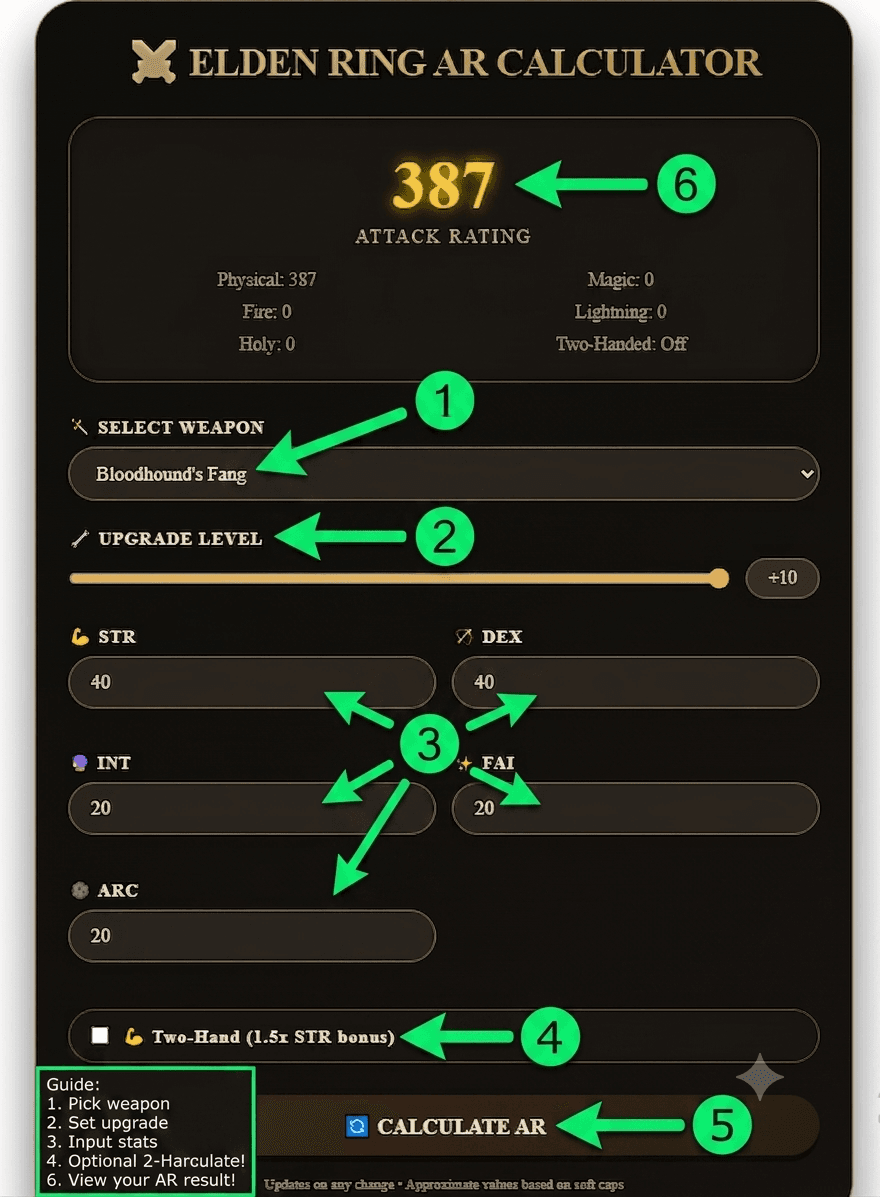
How to Use the Elden Ring AR Calculator (Step-by-Step)
- Select Your Weapon: Choose from 20+ meta weapons like Bloodhound’s Fang, Moonveil, or Rivers of Blood. The tool supports both standard (+25) and somber (+10) upgrade paths.
- Set Upgrade Level: Slide the bar to your current weapon level. The calculator automatically adapts base damage and scaling multipliers based on the upgrade tier.
- Input Character Stats: Enter your current Strength, Dexterity, Intelligence, Faith, and Arcane attributes (ranging from 1 to 99).
- Toggle Two-Handing: Check the box if you are two-handing the weapon. This applies a 1.5x multiplier to your Strength stat before calculating scaling damage.
- Read Instant Results: The calculator updates your total AR and elemental breakdown in real-time without needing to click a refresh button.
Worked Example: Bloodhound’s Fang at Different Stat Investments
Here’s how the math plays out for one popular weapon, Bloodhound’s Fang at +10. Attribute soft caps for damage stats occur at 20, 40, 60, and 80, according to the Elden Ring Wiki stat mechanics guide [1] — which is why AR gains taper off noticeably once you push past 40 in a scaling stat rather than continuing to climb at the same rate.
| Build Scenario (Bloodhound’s Fang +10) | Total AR |
|---|---|
| 20 STR / 20 DEX (One-Handed) | 378 |
| 40 STR / 40 DEX (One-Handed) | 491 |
| 40 STR / 40 DEX (Two-Handed) | 534 |
Notice the jump from one-handed to two-handed at the same 40/40 stats: the 1.5x Strength multiplier on two-handing is worth more here than most players expect, which is exactly the kind of trade-off this calculator is built to make visible instantly instead of requiring manual math.
How We Calculate Attack Rating (AR)
The calculator uses a stat-scaling model built from publicly documented Elden Ring mechanics. First, it calculates base damage using the weapon’s base values multiplied by the upgrade multiplier (1 + upgrade_level * 0.1). Then it calculates scaling bonuses using a stat factor function: if a stat is 20 or below, the factor is stat * 0.5; between 21 and 40, it scales at 0.75 per point, reflecting the diminishing returns [2] curve documented by the community. Two-handing multiplies Strength by 1.5 (capped at 99) before applying the scaling factor, matching how the game itself handles the bonus.
Frequently Asked Questions
Is this Elden Ring weapon calculator accurate to the actual game?
The formula is built from the stat-scaling mechanics documented by the Elden Ring community wiki (linked above), which is the same source most build-planning tools and guides rely on. If you spot a weapon where the output doesn’t match your in-game status screen, let me know and I’ll look into it — the tool is actively maintained.
Does two-handing really multiply Strength by 1.5?
Yes. Two-handing a weapon in Elden Ring multiplies your effective Strength by 1.5, capped at 99. Our calculator applies this 1.5x multiplier to your Strength input before calculating the scaling bonus, matching how the game engine handles it.
Can I use this calculator for somber weapons?
Absolutely. The calculator automatically detects if a weapon is on the standard path (+25) or somber path (+10) and adjusts the upgrade slider’s maximum value accordingly.
Do you plan to add weapon affinities like Blood or Occult?
Currently, the tool uses the weapon’s default scaling letters. Full affinity support (Heavy, Keen, Quality, Magic, Blood, Occult) is planned for a future update. For now, this tool covers unique/somber weapons and standard physical infusions.
Explore More Free Gaming Tools
If you found this AR calculator useful, check out the other tools on the site. You can generate custom Elden Ring health bars for streaming overlays, create stylized text with the Elden Ring font generator, or plan your next playthrough with the Dark Souls Build Calculator.