Dark Souls Studio 3.0
Cursed Font & Banner Generator
0
By Sharjeel · Lead Developer, Ghostern · Updated September 12, 2026
The Dark Souls font generator lets you create Dark Souls-inspired text graphics, death-screen messages, boss-style overlays, item banners, and dark-fantasy typography directly in your browser. Customize the text, color, glow, background, and optional HUD-style elements, then export your design as a PNG.
I built this tool after finding that many online text generators either had limited customization, added watermarks, or focused on generic fonts. The goal was to create a practical browser-based editor for gaming thumbnails, memes, overlays, social posts, and other Dark Souls-inspired designs.
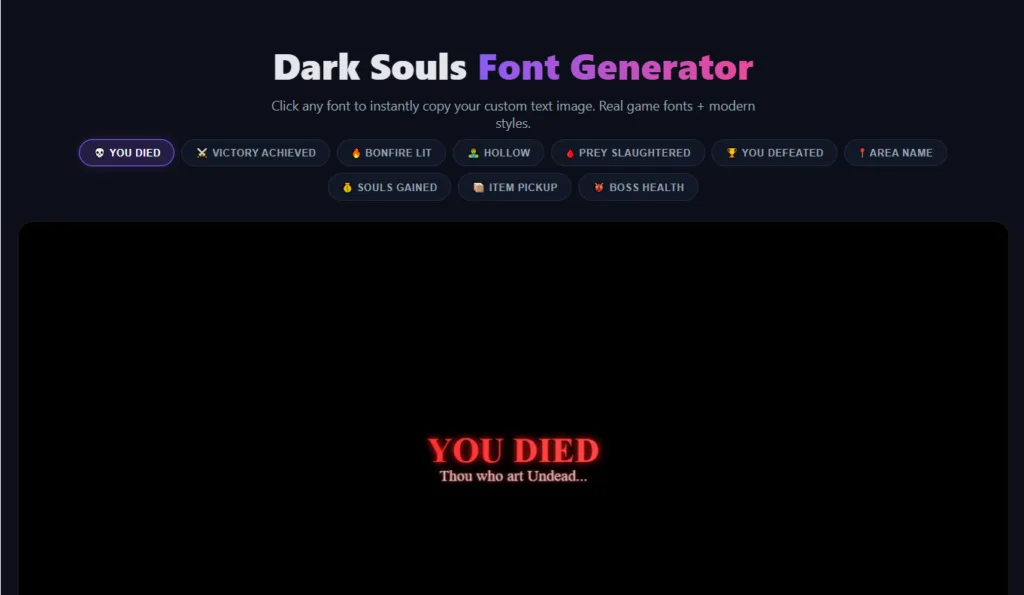
Create custom game-inspired messages using the live preview, typography controls, backgrounds, and optional overlay effects.
What the Dark Souls Font Generator Can Create
The generator is designed for projects that need a dark-fantasy or Soulslike visual style.
- Custom text graphics: Create titles, subtitles, death-screen messages, boss-style displays, item pickup banners, and other gaming graphics.
- PNG export: Download your finished design as a PNG image.
- Clipboard support: Copy the generated image when your browser supports image clipboard access.
- Canvas: The default canvas is 1200×600px, with larger dimensions available when the background-fitting option is supported by the selected image.
- Font choices: Use a selection of serif and gothic-inspired typefaces, including Cinzel and other alternatives suited to medieval and dark-fantasy designs.
- Browser support: Designed for modern Chrome, Firefox, Safari, and Edge browsers on desktop and mobile devices.
- Browser-based processing: The generator renders the design in your browser using client-side features.
- Custom backgrounds: Upload your own image and combine it with the generated typography and effects.
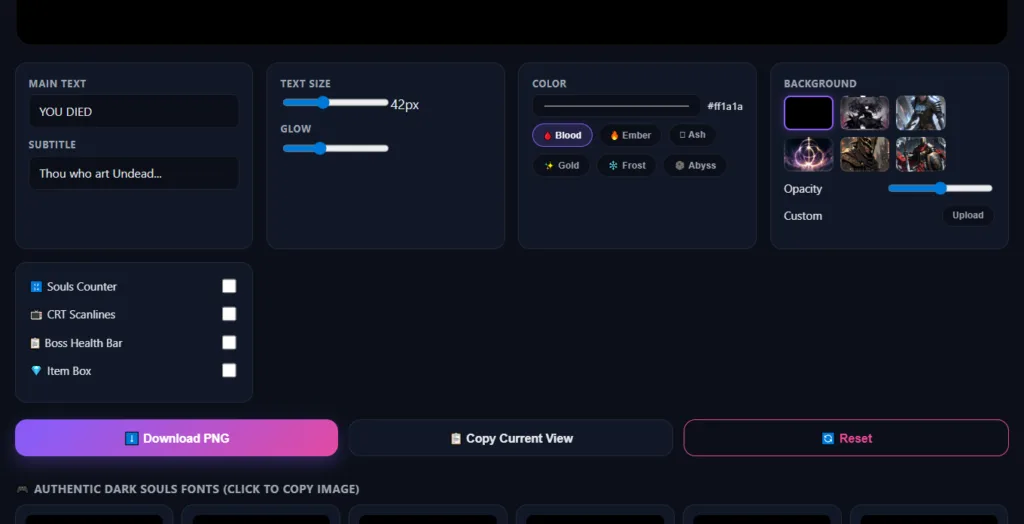
Use the customization controls to adjust the appearance of your text and combine it with dark-fantasy backgrounds and HUD-style effects.
How to Use the Dark Souls Font Generator
1. Enter your message
Start by entering your own text or choose one of the available presets such as YOU DIED, VICTORY ACHIEVED, BONFIRE LIT, or other game-inspired messages.
You can also add a subtitle or supporting text for thumbnails, memes, videos, and custom gaming graphics.
2. Customize the typography
Adjust the text size and visual intensity to match your design. Select a preset color style such as:
- Blood
- Ember
- Gold
- Frost
- Abyss
You can also use a custom hexadecimal color value when you need a specific shade.
3. Choose a background
Select a background from the available gallery or upload your own image. Background controls let you change the visual balance between the image and the generated text.
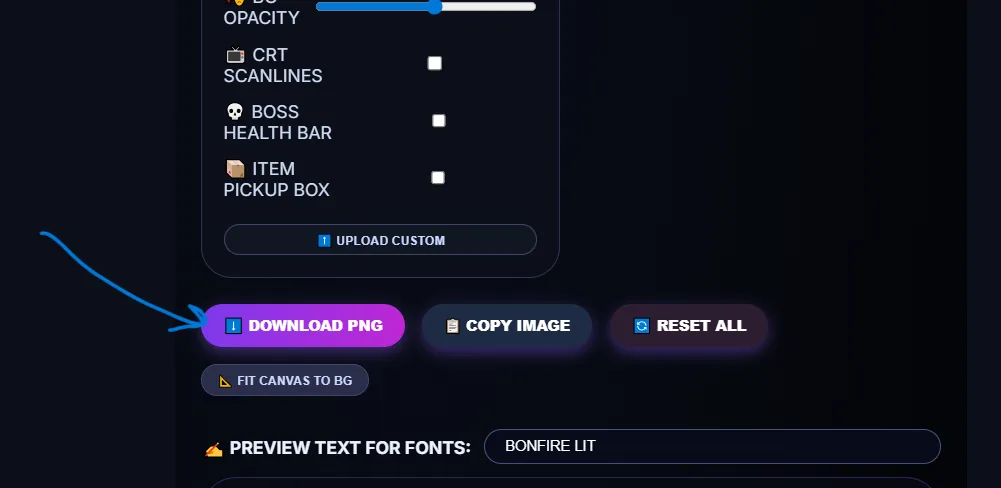
When using a custom background, Fit Canvas to BG can be used to match the canvas to the background’s dimensions within the tool’s supported limits. This helps reduce unwanted stretching or cropping.
4. Add optional game-inspired overlays
The generator includes several optional visual elements that can be enabled or disabled depending on the design:
- Boss Health Bar: Add a boss-style name and health bar for memes, thumbnails, or fictional encounters.
- Item Pickup Box: Add an item-style notification element.
- Souls Counter: Add a decorative currency-style display.
- CRT Scanlines: Add a retro display texture to the image.
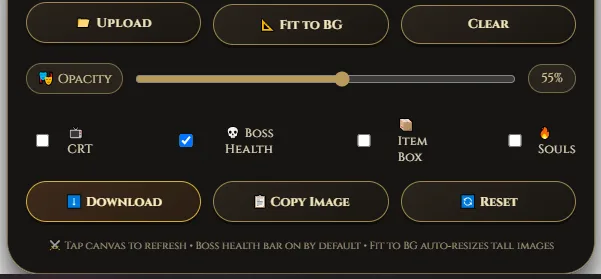
5. Export your image
When the design is ready, select Download PNG to save it to your device. On supported browsers, Copy Image lets you paste the result into applications that accept image clipboard content.
Fonts and Effects
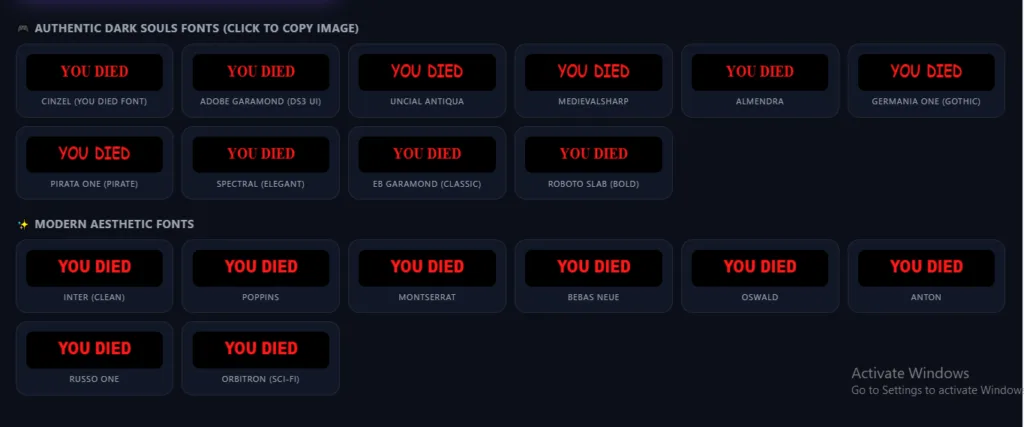
The font library combines serif and gothic-inspired typefaces to create a visual style that works well for Soulslike gaming projects. Cinzel is included as one of the main choices because of its suitability for this type of medieval and fantasy-inspired typography.
Each selected font is rendered in the live preview, allowing you to compare different styles before exporting your image.
The generator also includes glow and color controls that can give text a brighter, fiery, icy, or shadowed appearance without requiring a separate image editor.
Stylized Text Generator
Below the main image generator, you can also find a collection of Unicode-based text styles. These include variations such as bold, blackletter, double-struck, and other decorative styles.
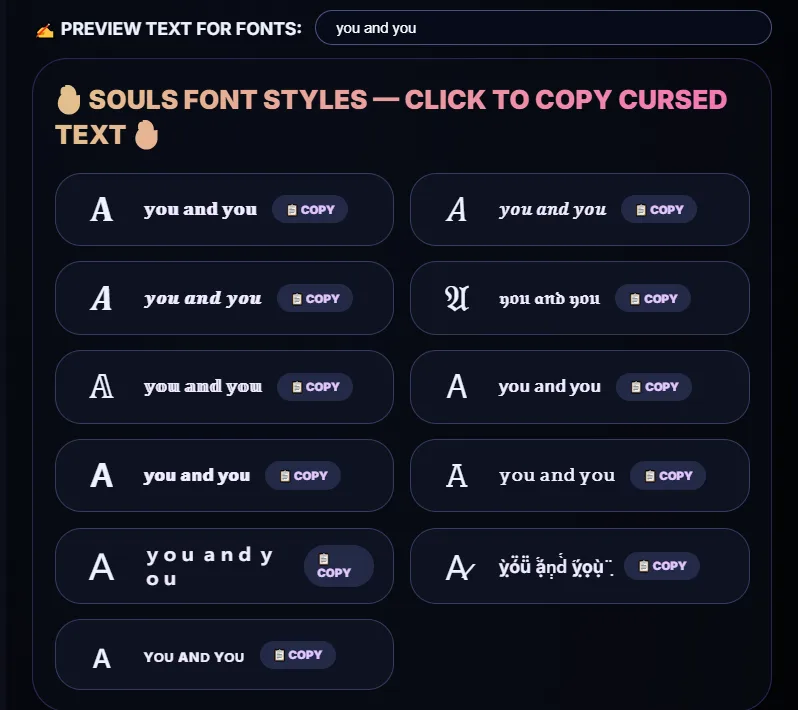
Unlike PNG graphics, Unicode text can be copied directly and used in places where image uploads are not practical.
How to Export a PNG
- Finish your text, color, background, and overlay settings.
- Click Download PNG to save the current design.
- Use Copy Image when image clipboard support is available in your browser.
The tool uses a default 1200×600px canvas. Supported background-fitting options can change the canvas dimensions according to the selected image and the limits of the generator.
For print projects or larger compositions, you can further upscale the exported PNG using an image editor or other image-processing software.
Using the Generator on Mobile
The generator is designed to work on modern smartphones and tablets as well as desktop browsers.
- Text controls, sliders, color controls, and background selection can be used with touch input.
- Download PNG is the recommended export method on mobile.
- Copy Image depends on browser support for image clipboard features and may behave differently across mobile browsers.
When image copying is unavailable, download the PNG instead and share it from your device.
Dark Souls Font Generator Licensing & Trademark Disclaimer
This is an independent fan-made, game-inspired tool. Ghostern is not affiliated with, endorsed by, or sponsored by FromSoftware, Inc. or Bandai Namco Entertainment.
Dark Souls and related game names, characters, logos, artwork, and trademarks belong to their respective rights holders.
The generator provides editing and image-generation functionality. Your use of any third-party game names, artwork, logos, characters, or other protected material should comply with the rights and policies that apply to that material.
For commercial projects involving Dark Souls branding or other protected game assets, review the applicable rights, permissions, and publisher policies before publishing or selling your work.
Troubleshooting
Why does my exported image look blurry?
The default canvas is 1200×600px. For designs that need more pixels, try using a larger source image and the available background-fitting option, within the generator’s supported dimensions.
Why does my background look stretched?
This can happen when the uploaded image has a different aspect ratio from the canvas. Use Fit Canvas to BG when available to better match the canvas to the selected background.
Why doesn’t Copy Image work on my phone?
Image clipboard functionality depends on browser and operating-system support. Some mobile browsers have restrictions that prevent image copying. Use Download PNG as the alternative.
Why is my uploaded background not appearing?
Check that the selected image is supported by your browser and that it has finished loading. Very large images may take additional time to decode and display.
Frequently Asked Questions
What font is closest to the Dark Souls style?
Dark Souls uses its own game typography and branding. This generator includes Cinzel and other serif and gothic-inspired typefaces that can work well for a similar visual direction.
Can I use the generated images on YouTube or Twitch?
You can use the tool to create graphics for projects such as thumbnails, overlays, videos, memes, and social content. When your design includes third-party Dark Souls artwork, logos, characters, or other protected material, make sure your use complies with the rights and policies that apply to that material.
Is the Dark Souls font generator free?
Yes. The generator is available online without requiring an account for the core tool experience.
Do I need to install a font?
No. The supported fonts are used by the web-based generator, so you can create your design without manually installing a font on your computer.
Can I upload my own background?
Yes, the generator supports custom background images where the browser and tool configuration allow image uploads.
Is my uploaded background sent to a server?
The generator is designed around browser-side image processing. Uploaded images used by the canvas are handled by the browser during the editing session. For the most accurate description of data handling, refer to Ghostern’s Privacy Policy.
What is the difference between the Dark Souls and Elden Ring font generators?
Both tools use a dark-fantasy gaming aesthetic, but they offer different presets, controls, and presentation styles. For Elden Ring-inspired graphics, see the Elden Ring Font Generator.
More Gaming Tools from Ghostern
- Elden Ring Font Generator — create Elden Ring-inspired fantasy text graphics.
- Elden Ring Health Bar Generator — create custom boss-style health bars and gaming overlays.
- Dark Souls Build Calculator — plan character stats and equipment for different build ideas.
- GTA Font Generator — create Grand Theft Auto-inspired logo-style text.
- Pixel Art Font Generator — create retro pixel-style text graphics.
- Discord Symbol Generator — copy decorative symbols and Unicode text styles.
- All Gaming Fonts — browse Ghostern’s gaming font and text generators.
Important Fan-Made Tool Notice
Ghostern’s Dark Souls Font Generator is an independent web tool created for fans and creators. It does not claim to reproduce or provide official Dark Souls fonts, assets, software, or branding.
Dark Souls and related intellectual property belong to their respective owners.