Retro • Pixel • 8-Bit
Pixel Art Font Generator
Create crisp retro text with pixel-friendly fonts, 3D depth, custom outlines, platform-ready canvas sizes, classic palettes, and instant PNG/SVG export.
🖼️ Live Pixel Workspace
800 × 400px⚙️ Generator Controls
Press Start 2PFour pixel/retro Google Fonts are loaded only on pages using this shortcode.
 By Sharjeel
·
·
By Sharjeel
·
·
Ghostern’s Pixel Art Font Generator is a free online tool for creating crisp retro text in a pixel-art style. Type your message, choose a pixel font, adjust the text size, shadow, outline, colors, and canvas dimensions, then export your design as a transparent PNG or SVG.
The generator is designed for gaming graphics, thumbnails, Twitch overlays, social posts, indie game assets, banners, logos, and other projects that need authentic-looking retro typography without a signup or watermark.
✨ Pixel Art Font Generator Features
📖 How to Use the Pixel Art Font Generator
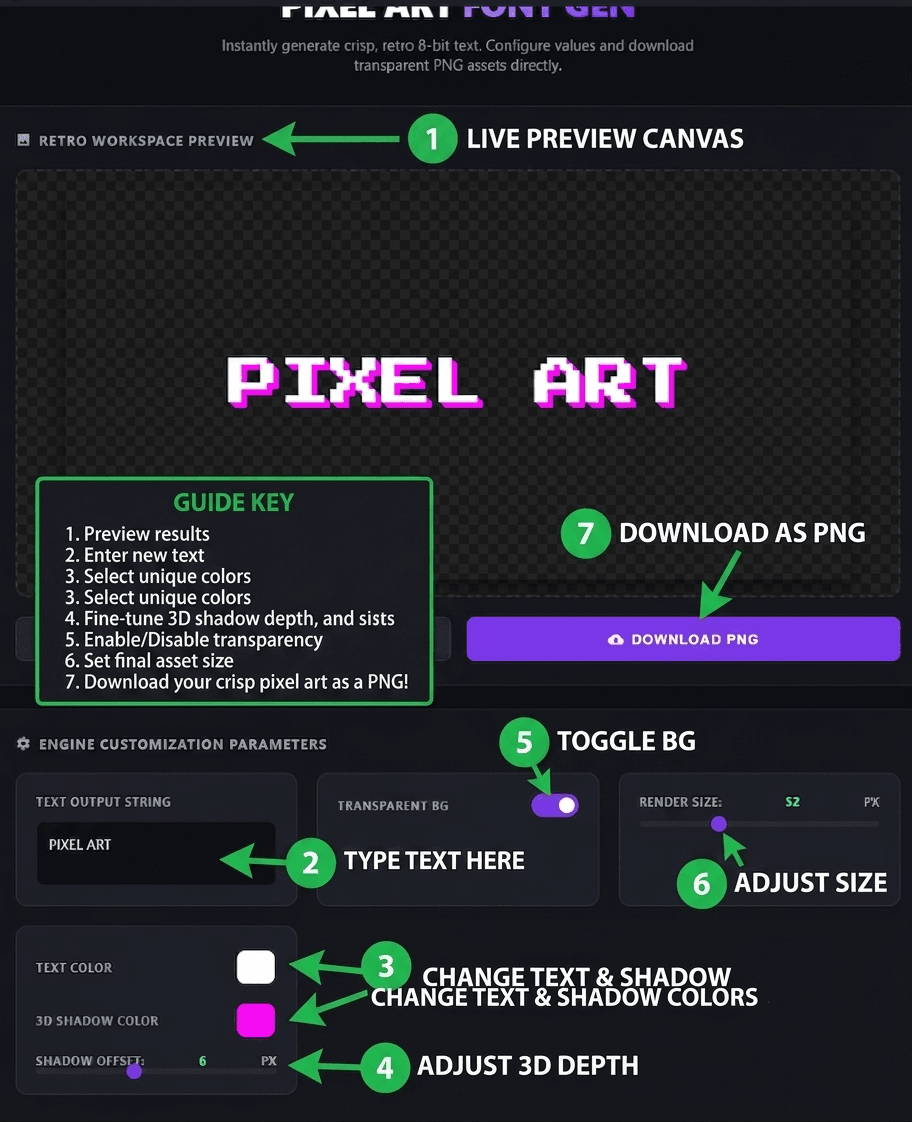
Creating retro pixel text takes only a few steps. Enter your text, customize the appearance in the controls, preview the result live, and export your finished design.
⚙️ Step-by-Step
- Type your text. Enter your message in the text box. Press Enter to create multiple lines; each line is automatically centered on the canvas.
- Choose a pixel font. Select Press Start 2P, VT323, Silkscreen, or Pixelify Sans depending on the retro style you want.
- Adjust the text size. Use the font-size control to make your lettering smaller or larger while previewing the result in real time.
- Choose your text color. Pick any custom color using the text color control.
- Add a 3D shadow. Choose a shadow color and adjust the shadow depth to create a chunky arcade-style depth effect.
- Add an outline. Enable the outline effect and choose a stroke color and width. A thin outline can improve readability over screenshots, gameplay footage, and colorful backgrounds.
- Apply a retro palette. Select NES, Game Boy, CGA, or Vaporwave to quickly apply a coordinated retro color scheme.
- Choose a canvas preset. Pick Default 800×400, Square 512×512, Wide Banner 1200×400, YouTube Thumbnail 1280×720, or Twitch Alert 600×200.
- Choose your background. Keep the background transparent for overlays or switch to a solid background color for a standalone graphic.
- Export your artwork. Download your finished design as a crisp PNG or SVG depending on your project requirements.
🎨 Retro Color Palette Presets
The built-in palette presets make it easy to create a consistent retro aesthetic without manually choosing every color. Select a palette and use it as a starting point for your text design.
- NES — inspired by classic Nintendo-era console colors.
- Game Boy — a limited green-toned palette inspired by the original handheld display.
- CGA — a classic early-computer palette with bold, highly contrasting colors.
- Vaporwave — neon-inspired pink, purple, cyan, and blue combinations for a more modern retro aesthetic.
You can apply a preset and then continue customizing the individual colors to create your own combination.
🖍️ Outline & Stroke Effect
The outline feature adds a visible stroke around your pixel text before the main fill is rendered. This creates stronger separation between the lettering and its background and is especially useful for thumbnails, gaming overlays, logos, and busy images.
Choose both the stroke color and stroke width to control how subtle or bold the outline appears. A small stroke is often enough to improve readability without hiding the pixel character of the font.
📐 Canvas Size Presets
Different projects need different dimensions, so the generator includes ready-made canvas presets instead of forcing every design into one fixed size.
800×400 — general-purpose pixel text graphics.
512×512 — useful for square graphics and social assets.
1200×400 — designed for wide headers and banners.
1280×720 — ideal for gaming thumbnails and video artwork.
600×200 — useful for follower, subscriber, donation, and stream alert graphics.
💾 PNG & SVG Export
Use PNG export when you need a ready-to-use raster image for thumbnails, overlays, social posts, websites, or video editing.
Use SVG export when you need a scalable vector representation that can be used in compatible design and web workflows without being tied to one raster canvas resolution.
Transparent-background output is particularly useful when you want to place your pixel text directly over gameplay footage, screenshots, videos, websites, or other artwork.
🧠 Glossary — Pixel Art & Retro Typography
Pixel Art Font – a typeface designed with blocky, pixel-inspired forms that evoke classic computer, arcade, and console graphics.
Press Start 2P – a well-known arcade-inspired pixel font commonly used for gaming and retro designs.
VT323 – a bitmap-style typeface with a terminal and vintage computer appearance.
Silkscreen – a compact pixel-style font suited to retro interfaces and game-inspired graphics.
Pixelify Sans – a modern pixel-inspired typeface designed for digital and retro-themed projects.
3D Shadow – an offset duplicate of the text used to create visible depth behind the main lettering.
Outline / Stroke – a colored border drawn around the outside of the text to increase contrast and visual separation.
Retro Color Palette – a limited group of coordinated colors inspired by older consoles, computers, handheld systems, or retro-futuristic design.
Transparent PNG – an image with an alpha channel that allows the background to remain invisible.
SVG – a scalable vector graphics format that can represent artwork independently of a fixed raster resolution.
Crisp Edges – sharp rendering intended to preserve the hard pixel-inspired appearance instead of introducing soft blurry edges.
🎯 What People Use This For
- 🎬 YouTube thumbnails & channel art — create bold retro titles that stand out in gaming content.
- 🎮 Twitch overlays & alerts — make follower, subscriber, donation, and stream alert graphics.
- 📱 Social posts — create pixel-style captions, gaming quotes, and retro graphics.
- 🕹️ Indie game development — design titles, UI text, labels, dialogue graphics, and prototypes.
- 🖼️ Merch & print concepts — create arcade-inspired lettering for shirts, stickers, posters, and promotional artwork.
- 📹 Video editing — add retro titles and overlays to gameplay footage and video projects.
- 💬 Discord graphics — create server titles, community graphics, banners, and custom text assets.
- 🌐 Web design — generate pixel-inspired headings and decorative text for gaming and retro-themed websites.
✅ Best Practices for Pixel Text
- Keep text readable. Strong contrast between the text and its background generally produces the clearest result.
- Use a suitable font size. Larger text gives pixel fonts more room to show their distinctive shapes.
- Use moderate shadow depth. A smaller shadow often gives cleaner results, while deeper shadows create a more dramatic arcade effect.
- Use an outline over busy backgrounds. A thin contrasting stroke can prevent letters from disappearing into gameplay footage or colorful images.
- Try a limited palette. NES, Game Boy, and CGA styles work especially well when you want a deliberately restricted retro color scheme.
- Use transparent backgrounds for overlays. Transparent PNG output makes it easy to place the generated text on top of existing graphics or video.
- Choose the correct canvas before exporting. Starting with the correct dimensions helps your text composition fit the intended platform or project.
📊 Ghostern vs. Other Pixel Font Tools
Here’s a practical feature comparison for users looking for a flexible pixel-art text generator.
| Feature | Ghostern | Other Tools |
|---|---|---|
| No signup / no watermark | ✓ | Varies |
| Multiple pixel fonts | ✓ 4 fonts | Varies |
| Adjustable 3D shadow | ✓ | Varies |
| Outline / stroke color & width | ✓ | Varies |
| Canvas size presets | ✓ 5 presets | Varies |
| NES / Game Boy / CGA palettes | ✓ | Varies |
| Vaporwave palette | ✓ | Varies |
| Transparent PNG export | ✓ | Varies |
| SVG export | ✓ | Varies |
Feature availability can vary between third-party pixel text and font-generation tools.
👤 About the Author
Sharjeel
Founder & lead developer at Ghostern — I build and maintain the tools published on this site.
❓ Frequently Asked Questions
What is the best font for pixel art text?
Press Start 2P is a popular choice for classic arcade-inspired text, while VT323, Silkscreen, and Pixelify Sans offer different retro styles. The generator lets you switch between all four.
Is the Pixel Art Font Generator free to use?
Yes. The tool is designed for quick browser-based pixel text generation without requiring an account.
Can I use generated PNGs in my projects?
The generated image itself can be used for projects such as thumbnails, overlays, websites, game prototypes, videos, social graphics, and similar creative work. Check the applicable font license for the typeface you select when your project requires font redistribution or embedding.
Can I add an outline to pixel text?
Yes. The outline feature lets you choose a stroke color and adjust the stroke width around your text.
Which retro color palettes are available?
The generator includes NES, Game Boy, CGA, and Vaporwave palette presets. You can apply a preset and continue customizing the resulting colors.
What canvas sizes are available?
The presets are Default (800×400), Square (512×512), Wide Banner (1200×400), YouTube Thumbnail (1280×720), and Twitch Alert (600×200).
Can I download the result as SVG?
Yes. In addition to PNG export, the generator includes SVG export for projects that need scalable vector artwork.
Can I create a transparent PNG?
Yes. Transparent background is supported, making the generated artwork useful for overlays, thumbnails, videos, websites, and other layered designs.
Does it support multi-line text?
Yes. Press Enter in the text box to add another line. The lines are automatically positioned and centered on the canvas.
Does the tool work on mobile?
Yes. The interface is designed to work responsively across desktop and mobile screen sizes.
Is this affiliated with Nintendo or any game company?
No. Ghostern’s Pixel Art Font Generator is an independent tool and is not affiliated with Nintendo, Capcom, or any other game publisher.
🧭 More Tools from Ghostern
Sources & references:
Font information and licensing should be checked on the respective Google Fonts specimen pages. Pixel art is a digital art style associated with low-resolution, deliberately pixelated graphics.
Built and maintained by
Sharjeel
at
Ghostern.
📅 Last updated: September 2026 · First published: June 2025