
Elden Ring Health Bar Generator
Create custom death screens, boss health bars, and BONFIRE LIT banners for streaming and memes.
💀 Text & Style
🎨 Color & Effects
🗡️ Background
 By Sharjeel ·
 Ghostern’s Elden Ring Health Bar Generator is a free, browser-based tool that creates boss-style banners, “YOU DIED” memes, and FromSoftware-inspired PNG graphics. Use it for YouTube thumbnails, Twitch overlays, Discord posts, wallpapers, or fan edits — no Photoshop required.
I built this after spending hours trying to recreate Elden Ring’s boss health bars for my own thumbnails and stream overlays — opening Photoshop, finding the right font, and matching the glow manually every time. Everything here runs in your browser: no signup, no watermarks, no data collection.
Elden Ring’s bosses are distinguished by a health bar and name that appear at the bottom of the screen when a fight begins, per the Fextralife Elden Ring Wiki. Boss health bars in games like this are widely understood as a tension-building device — that moment when the bar appears and you know a fight is starting is exactly what this generator helps you recreate.
How to Create Your Elden Ring Boss Health Bar
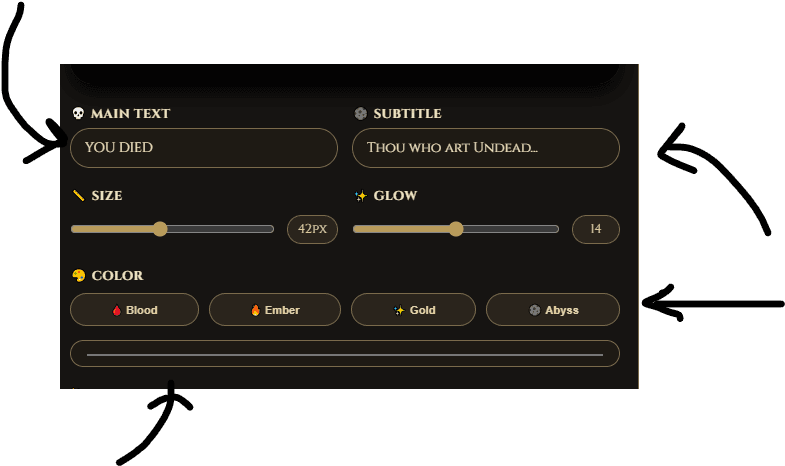
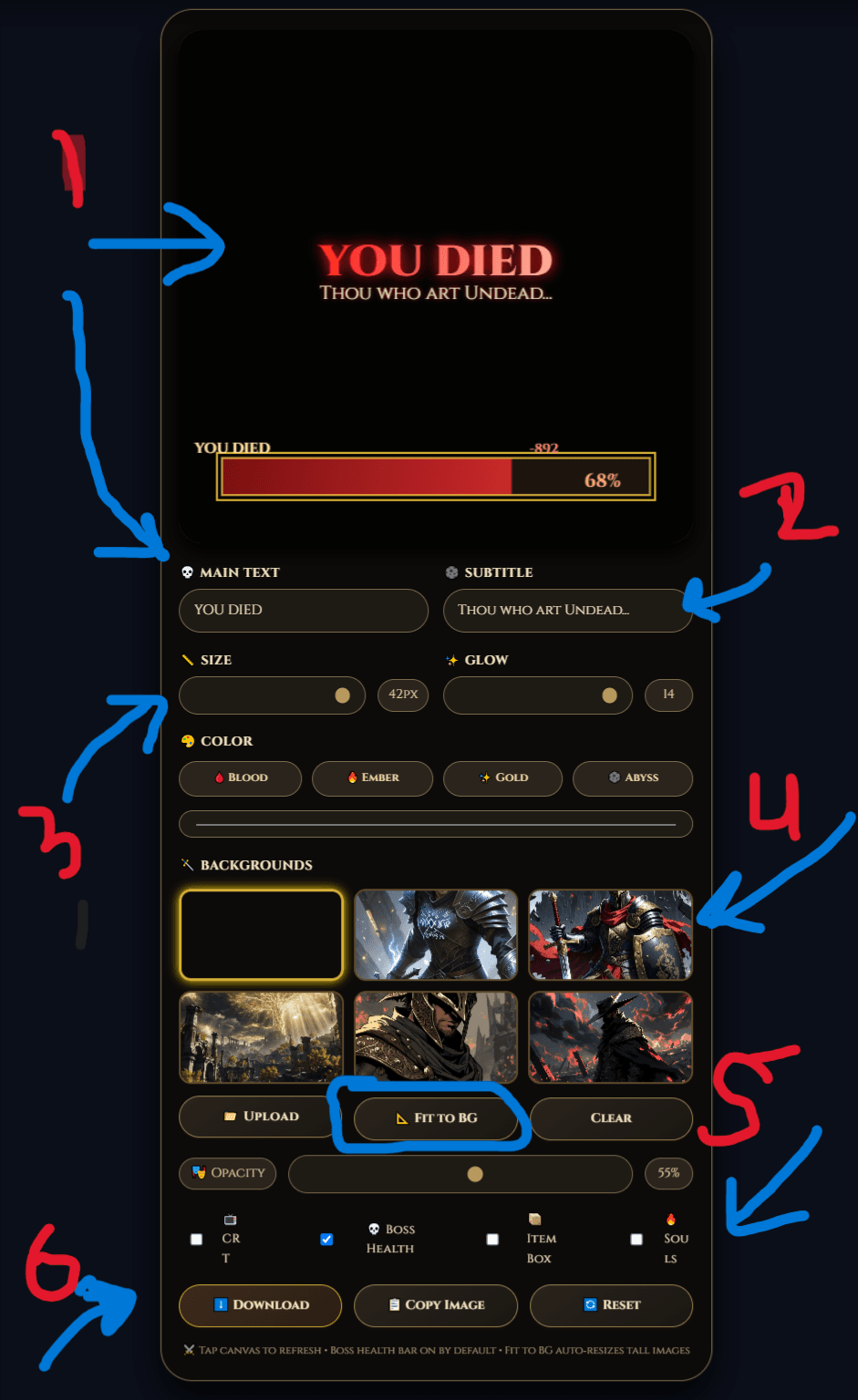
Type your text, tune the style, choose a background, switch on overlays if needed, and export the final image.
Step-by-Step
- Enter your text — a boss name, meme text, or a phrase like “YOU DIED” or “GREAT ENEMY FELLED.”
- Tune the style — adjust size, glow intensity, and color. Gold gives the classic look; darker reds feel more cursed.
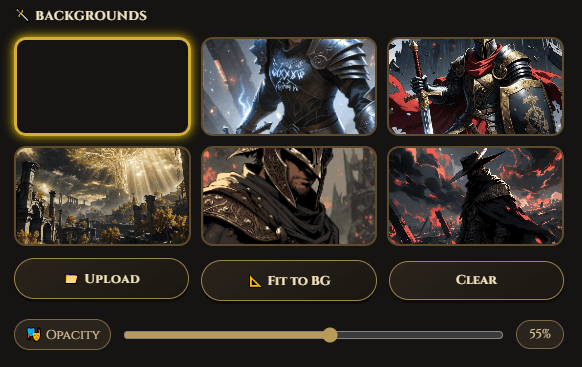
- Choose a background — a gothic preset or your own image, with an opacity slider to balance text and scene.
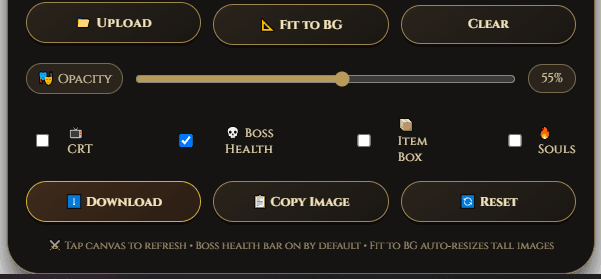
- Toggle overlays — boss health bars, item boxes, souls counters, or CRT scanlines.
- Fit the canvas to your background — useful for wallpapers and vertical formats.
- Download a high-quality transparent PNG.
What the Controls Do
The text controls set the tone, from a heavy boss-name title to a short meme phrase. Glow and color settings keep text readable against dark backgrounds. The background section builds atmosphere — a darker image reads as more authentic, lower opacity keeps text legible. The overlay toggles turn a plain text image into a game-accurate asset: boss health bar for drama, item box for flavor, souls counter for detail, CRT scanlines for a retro finish.
Best Ways to Use Your Generated PNG
- YouTube thumbnails — boss fight videos and challenge runs.
- Twitch overlays — alert graphics matching a dark fantasy theme.
- Discord posts — memes, announcements, or roleplay banners.
- Wallpapers — phone or desktop backgrounds.
- Fan edits — dramatic titles on clips or screenshots.
Design Tips
Short text usually works best — one or two words often reads as a stronger “boss title” than a full sentence, and uppercase holds up better at thumbnail size. Gold is the safest choice for the classic look; darker reds and shadowed colors feel more dangerous. If you’re using a background image, keep enough contrast to stay readable. For vertical formats, fit the canvas to the background before exporting so nothing gets cropped.
Example Text Ideas
Why These Features Are Here
The fit-to-background option exists because wallpapers and vertical memes need the canvas to match the image, not a fixed size. Transparent PNG is the default export because most people are laying these banners over other footage or images rather than using them standalone. The overlay toggles started as a small extra and became one of the more-used parts of the tool, which is why they’re front and center in the controls rather than tucked away.
Ghostern vs. Other Free Elden Ring Banner Tools
| Feature | Ghostern | Most others |
|---|---|---|
| Custom text & glow controls | ✓ Yes | ✗ Limited presets |
| Multiple overlay toggles | ✓ Yes | ✗ Usually one style |
| Transparent PNG export | ✓ Yes | ✗ Often solid background |
| Fit canvas to background | ✓ Yes | ✗ Fixed size only |
| No sign-up required | ✓ Always | ✗ Often required |
Comparison based on public tool pages as of September 2026.
About the Author
Frequently Asked Questions
What does this tool do?
It creates Elden Ring-inspired banners, boss health bars, and meme graphics with text, glow, backgrounds, and overlays that match a dark fantasy gaming style.
Can I use it for YouTube thumbnails?
Yes — bold text and a dramatic layout export cleanly for thumbnails.
Can I make a “YOU DIED” meme?
Yes, that’s one of the most common uses.
Does it work for Twitch and Discord graphics?
Yes — exported PNGs work for stream overlays, alerts, and server announcements.
Does it work on mobile?
Yes, the layout is responsive.
Can I export a transparent background?
Yes — transparent PNG is the default, so you can layer the banner over other footage or images.
Is this tool free?
Yes — no signup, no watermark, no limit on exports.
Is this affiliated with FromSoftware or Bandai Namco?
No — this is an independent fan tool inspired by the game’s visual style.
Can I use it for other Soulslike games?
Yes — the style also suits Dark Souls, Bloodborne, Sekiro, and similar dark fantasy projects.
More FromSoftware Tools from Ghostern
Sources: Boss mechanics documented on the Fextralife Elden Ring Wiki.
Built and maintained by Sharjeel at Ghostern.
📅 Last updated: September 2026 · First published: June 2025
Privacy Policy · Terms of Service · Contact
Elden Ring, FromSoftware, and related names and trademarks belong to their respective owners. This is an independent fan tool, not affiliated with or endorsed by FromSoftware or Bandai Namco.