
The Dark Souls Font Generator – Your Instant Text Toolkit
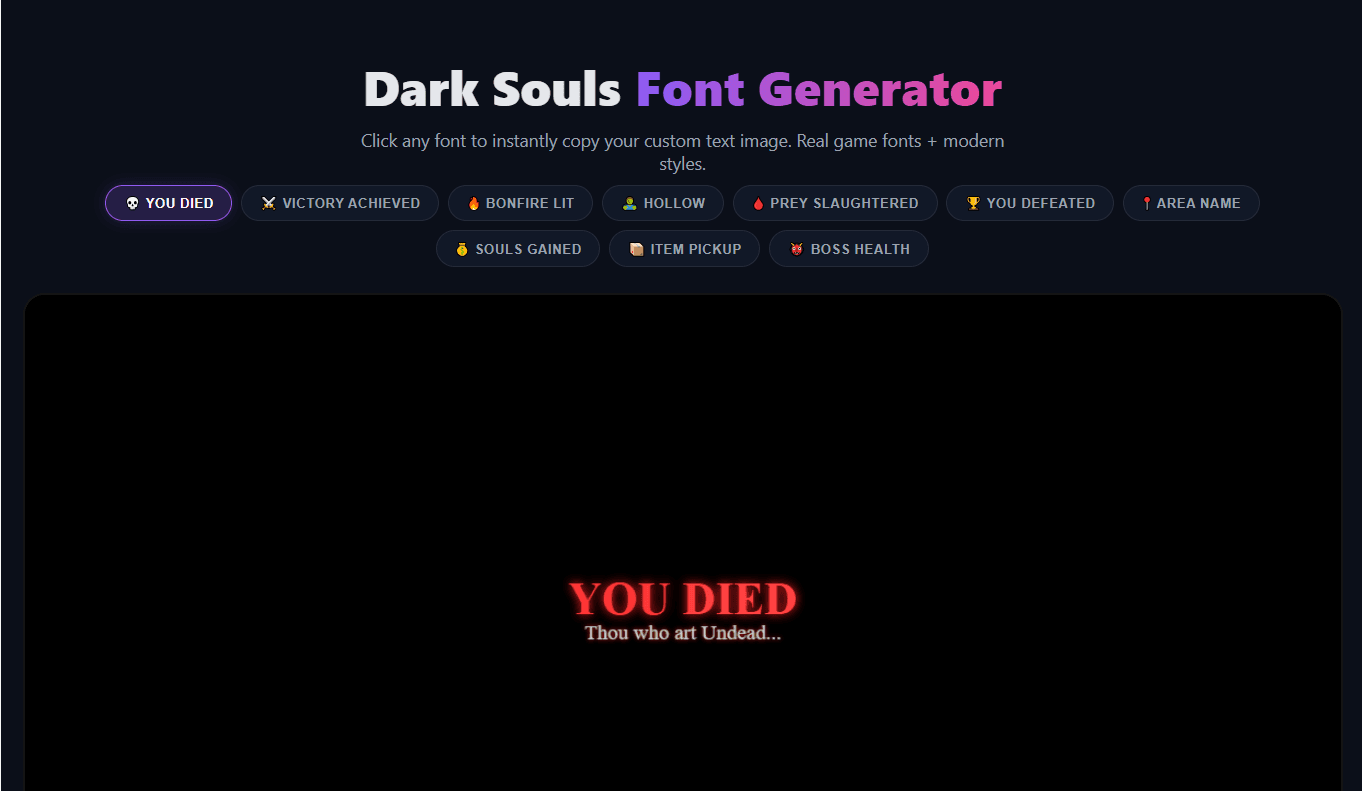
The Dark Souls font generator lets you create authentic game‑style text images in seconds. Choose from classic fonts like Cinzel and Uncial Antiqua, apply blood‑red glow, add a boss health bar or “YOU DIED” overlay, and download or copy your creation instantly. Whether you need a death screen for a meme, a victory message for your stream, or a custom bonfire announcement, this tool produces sharp, high‑resolution PNGs ready to share anywhere.
How to Use the Dark Souls Text Maker
1. Choose a Preset or Type Your Own
Click YOU DIED, VICTORY ACHIEVED, BONFIRE LIT, or any of the 10 presets. You can also type your own main text and subtitle for a completely custom message.
2. Style Your Text
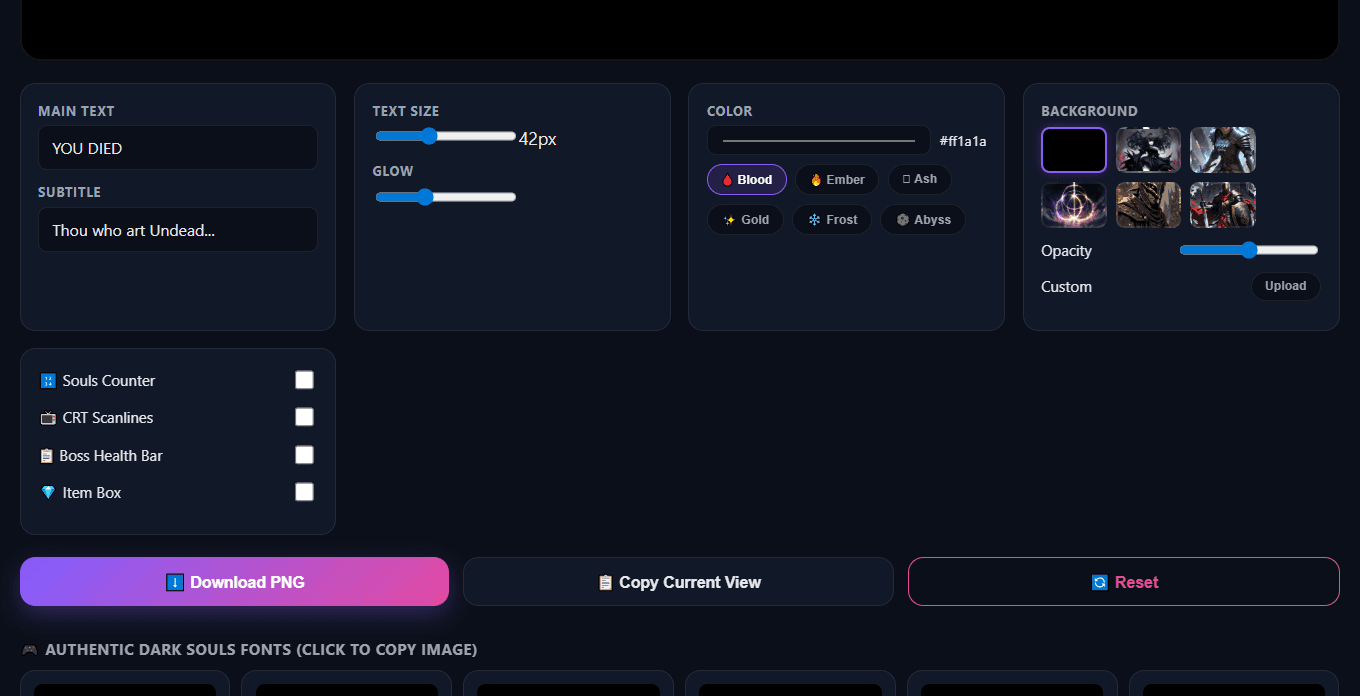
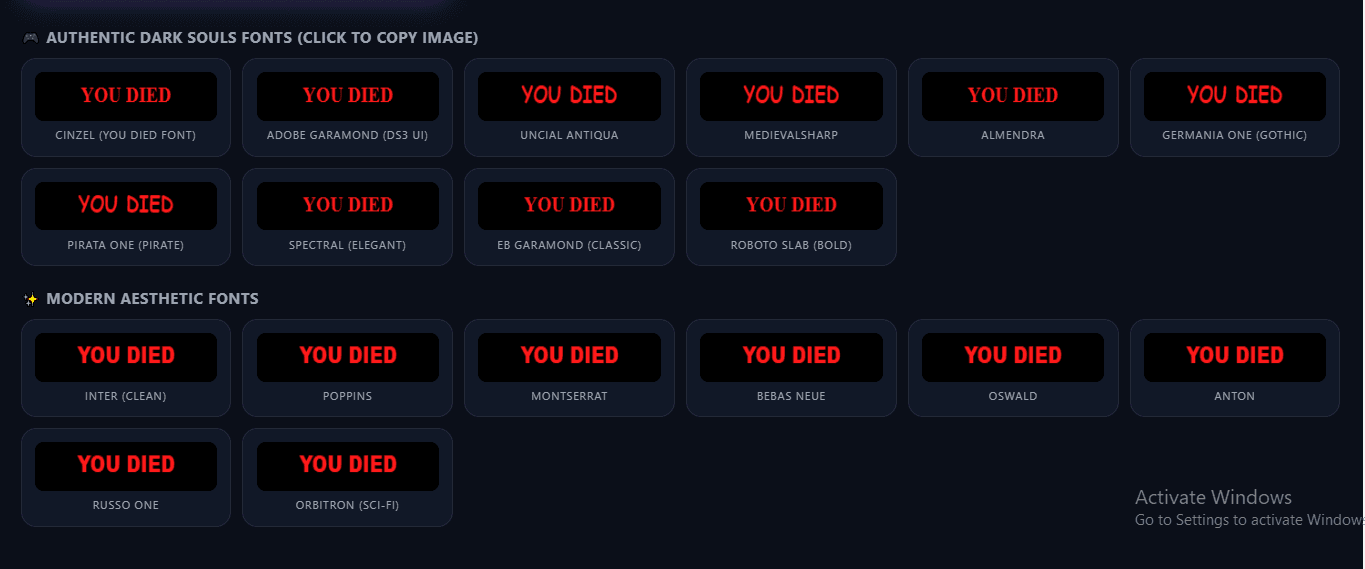
Pick a font from the library below the editor, adjust text size and glow intensity, and select a colour or use quick effects like Blood, Ember, Ash, Gold, Frost, or Abyss.
3. Set the Background
Choose a solid black canvas or a dark fantasy wallpaper from our gallery. You can also upload your own background image and control its opacity for the perfect blend.
4. Toggle Game‑Like Overlays
Switch on the Souls Counter, CRT Scanlines, Boss Health Bar, or Item Pickup Box to make your image look like a real Dark Souls screen capture.
5. Copy or Download
Click any font card to instantly copy your custom image to the clipboard, or use the Download PNG button to save a high‑resolution file.
Message Presets – Start with One Click
💀 YOU DIED
The classic death screen. Perfect for reaction memes, stream fails, and Discord trolls.
⚔️ VICTORY ACHIEVED
Celebrate a boss kill or a clutch round with this triumphant preset, complete with a boss health bar.
🔥 BONFIRE LIT
Announce a checkpoint, a new chapter, or just a chill moment with the iconic bonfire message.
🩸 PREY SLAUGHTERED
Inspired by Bloodborne, this grim preset works for finished enemies or brutal eliminations.
🧟 HOLLOW
For those moments when your character (or you) feels completely hollow inside.
🏆 YOU DEFEATED
A darker victory message – ideal for when you finally beat that impossible boss.
Every Control Explained
Fonts
12 authentic Dark Souls fonts (Cinzel, Garamond, Uncial Antiqua, MedievalSharp, Almendra, etc.) plus 8 modern styles. Click any font card to copy your image with that font instantly.
Text & Subtitle
Enter a main message (up to 50 characters) and an optional subtitle. Both support all languages and special characters.
Size & Glow
Adjust the main text size from 20 to 80 pixels. Control the glow blur (0–30) for a subtle or intense red flare.
Color Effects
One‑tap presets: Blood, Ember, Ash, Gold, Frost, and Abyss. Or pick any custom color with the color picker.
Backgrounds
Choose from 6 dark fantasy backgrounds (all from our Dark Souls wallpaper collection) or upload your own. Adjust opacity to dim the image behind your text.
CRT Scanlines
Adds a retro CRT monitor effect with subtle horizontal lines for an old‑school gaming feel.
Souls Counter
Displays a mock souls currency in the top‑right corner, just like the real game HUD.
Boss Health Bar
Adds a large boss HP bar at the bottom of the screen with the enemy name and a damage number.
Item Pickup Box
Generates the classic item‑found window with an icon placeholder, item title, and flavour text.
Export & Copy
Download a high‑resolution PNG, or copy the current canvas image directly to your clipboard with one click. Works on desktop and mobile.
Creative Ways to Use Your Dark Souls Text
YouTube Thumbnails
Add a dramatic "YOU DIED" or "VICTORY ACHIEVED" text over your gameplay footage to boost clicks and set the Dark Souls mood instantly.
Twitch Overlays & Alerts
Create a custom death screen alert or a "BOSS DEFEATED" overlay for your stream. Combine with our Discord symbol generator for complete branding.
Discord Messages & Memes
Make your friends laugh (or cry) with a perfectly timed "YOU DIED" reaction. Use the clan tag generator to personalize your server nickname.
Phone & Desktop Wallpapers
Layer your generated text over a Dark Souls mobile wallpaper or desktop background for a fully custom lock screen.
Fan Art & Posters
Use the high‑res PNG as a layer in your digital art projects, posters, or custom merchandise.
Reaction Images
Pair a "YOU DIED" text with a funny screenshot to create the ultimate gaming meme.
Frequently Asked Questions
What file format does the tool produce?
The tool generates PNG images. PNGs support transparency (optional) and are perfect for high‑quality thumbnails, overlays, and prints.
Can I save the image with a transparent background?
The canvas always starts with a solid background, but you can set the opacity to 0% or upload a completely transparent PNG as your background to achieve transparency. For most use‑cases, the solid background blends best.
Does this tool work on mobile?
Yes! The entire interface is mobile‑friendly. You can type, select presets, change fonts, and even copy/download directly from your phone.
Can I use my own fonts or backgrounds?
You can upload any custom background image. For fonts, we offer a built‑in library of 20+ styles, but you cannot upload custom font files at this time.
Is the tool free for commercial use?
Personal use (thumbnails, streams, memes) is totally free. For commercial projects, feel free to contact us about licensing.
Does the tool run entirely in my browser?
Yes. Everything is processed locally on your device. No uploads to a server, no account required. Once the fonts are loaded (a few Google Fonts), you can even use it offline.
Quick Fixes for Common Issues
Background not showing?
Make sure the image URL is from ghostern.com or you've uploaded a custom background. Some external images may be blocked by browser security; always use the built‑in gallery or your own file.
Blurry or pixelated output?
The canvas is rendered at 1200×600 pixels, which is sharp for screens and social media. If you need a larger size, download the PNG and upscale it slightly in any image editor.
Fonts not loading?
Our fonts are loaded from Google Fonts. If you have an ad blocker or a very slow connection, try refreshing the page or temporarily disabling extensions.
Mobile buttons too small?
The layout adapts to smaller screens, but if a button feels cramped, try using landscape mode on your phone. All main actions (download, copy) are large and easy to tap.
Copy not working?
Some browsers or devices restrict clipboard access. If the copy fails, a fallback download is triggered automatically. Alternatively, use the Download PNG button.
Cross‑origin error?
All backgrounds we provide are from the same domain to avoid this. If you use an external image, the canvas may become “tainted” and prevent copying. In that case, download only.
Other Free Tools You'll Love
Elden Ring Font Generator
Forge Tarnished‑worthy text in the iconic Elden Ring style.
Try It →Elden Ring Health Bar Generator
Create custom boss health bars for memes, streams, and thumbnails.
Use Tool →Clan Tag Generator
Design unique, Unicode‑stylised clan tags for CoD, Apex, and more.
Create Tag →Discord Symbol Generator
Decorate your server nickname with rare symbols and kaomoji.
Decorate →Pixel Art Font Generator
Turn any text into retro 8‑bit pixel style.
Pixelate →Vaporwave Text Generator
Wide, spaced‑out aesthetic lettering for Instagram and bios.
Create Text →Helpful Guides & Articles
Best Free Gaming Text & Font Generators in 2026
Compare the top tools for creating custom names, symbols, and aesthetic effects.
Read More →How to Match Your Desktop Wallpaper with Your Mood (Dark Souls Edition)
Find the perfect gloomy background to pair with your generated text.
Read Now →Make Dark Souls Art Look Perfect on Your Screen
Optimisation tips for wallpapers and overlays on ultrawide and mobile screens.
Optimise →10 Cool Discord Server Ideas Using Custom Names & Symbols
How to use our symbol and font tools to build a unique Discord community.
Get Ideas →Make Your Phone Actually Feel Like Yours
Combine custom fonts, wallpapers, and widgets for a unique home screen.
Customise →Aesthetic Wallpaper Color Theory Guide
Learn how to pick colours that match your mood and your generated text.
Learn →
About the Author: This tool was built by Ghostern,
a Gen Z gamer and developer who wanted to create the ultimate free resource for Dark Souls fans.
Not affiliated with FromSoftware or Bandai Namco.
Last updated: May 2026 | Privacy Policy |
Terms of Service
Fan project – all game assets and trademarks belong to their respective owners. We provide these tools for free for the community.